Lab #7 ended with one web page that took a local model nearly six hours. Six hours of material is good for a story but useless for comparison: one task, one run, and every episode of this series had used a different test, so I could never put two results side by side.
So I threw out the big one-shot tasks and wrote twelve small ones. Each takes a local model about ten minutes, each is checked by a script instead of by my eyes, and every model gets exactly the same tasks in exactly the same environment. Then I ran two local models through them: Qwen3.8 27B and Ornith 1.5 35B-A3B.
The short version:
- Qwen got full marks on 10 of the 12 tasks; 11 after one retry with more thinking. Ornith got 4, then 5. Ornith is about three times faster, but it drops details.
- More thinking barely helped. For Ornith it made two 3D tasks worse: it thought until the time ran out and never exported a file.
- I halved Qwen’s thinking limit and not one score went down. That’s the setting I use for real work now.
The setup
Twelve tasks, four tracks, three each:
| Track | Tasks |
|---|---|
| Coding (K) | K1 fix a rounding bug in a bill splitter · K2 write a duration parser from a spec · K3 add an edit command to a to-do CLI |
| Data and slides (P) | P1 clean a messy expenses CSV · P2 turn a markdown ledger into an Excel workbook · P3 build a 5-slide quarterly review deck from a CSV |
| Web apps (W) | W1 a weather app (Denver, °F/°C toggle) · W2 a to-do list · W3 a bill split and tip calculator |
| 3D printing in Blender (M) | M1 a phone stand (65°, cable hole) · M2 a box with a lid (0.3 mm clearance) · M3 a pair of meshing gears |
I picked the web apps because everyone in the US already knows what a good one looks like. The 3D parts all have to be real, printable STL files.
Scoring. Every task has a checker script. Before running any model, each checker passed a self-test: the untouched starting files fail, my reference answer passes every check, and a set of deliberately broken answers all get caught. The M3 checker, for example, counts the teeth, measures the outer diameters and the distance between centres, and checks that the two gears don’t overlap. The web checkers drive the page in a headless browser: type, click, reload, and resize to phone width.
A fair time limit. The two models run at very different speeds (Qwen about 35 tokens per second on my Mac, Ornith about 101), so a limit in minutes would really be a limit on speed. Instead each task gets the same 49,000 tokens, converted into minutes for each model based on its measured speed, plus five minutes of overhead. That gave Qwen about 26–28 minutes per task and Ornith 13. The question becomes: with the same amount of thinking, what can each one finish?
A locked environment. The harness version, the inference engines, the model files, the tool versions and every task file are fingerprinted. Before each task the runner checks the fingerprint, and if anything has changed it refuses to start.
The thinking rule. Every task runs first with the cheaper setting. Only the tasks that weren’t fully correct run again, once, with more thinking. Nothing else gets re-run.
The machine: an M5 Pro MacBook with 48 GB of memory. The harness is DeepSeek Harness (DSH) 0.2.2-rc.3 in headless mode. Qwen3.8 27B runs on Splash 1.5.0, the engine from Lab #8, with thinking at low; Ornith 1.5 35B-A3B (4-bit MLX) runs on oMLX 0.7.3, where thinking can only be switched on or off, so its first pass was off. The two engines never run at the same time.
Results
| Task | Qwen, low | Qwen, high (retry) | Ornith, thinking off | Ornith, thinking on (retry) |
|---|---|---|---|---|
| K1 fix a bug | 16/16 · 2 min | 16/16 · 1 min | ||
| K2 parser from spec | 35/35 · 10 min | 34/35 · 3 min | 33/35 · 9 min | |
| K3 add a feature | 20/20 · 3 min | 19/20 · 1 min | 20/20 · 2 min | |
| M1 phone stand | 11/11 · 26 min ⏱ | 7/11 · 13 min ⏱ | 0/11 · 13 min ⏱ | |
| M2 box and lid | 22/22 · 21 min | 12/22 · 13 min ⏱ | 0/22 · 13 min ⏱ | |
| M3 gears | 0/23 · 28 min ⏱ | 0/23 · 28 min ⏱ | 0/23 · 13 min ⏱ | 0/23 · 13 min ⏱ |
| P1 clean a CSV | 12/12 · 2 min | 12/12 · 20 s | ||
| P2 ledger to Excel | 8/8 · 10 min | 7/8 · 2 min | 7/8 · 7 min | |
| P3 quarterly deck | 10/10 · 6 min | 10/10 · 5 min | ||
| W1 weather app | 12/12 · 12 min | 12/12 · 2 min | ||
| W2 to-do list | 15/15 · 4 min | 4/15 · 1 min | 4/15 · 1 min | |
| W3 tip calculator | 7/11 · 4 min | 11/11 · 7 min | 4/11 · 1 min | 9/11 · 2 min |
| Full marks | 10 / 12 | 11 / 12 after retry | 4 / 12 | 5 / 12 after retry |
⏱ = hit the time limit.
Three things stand out. Qwen is steady: apart from the gears, its only miss was one bug in W3. Ornith is fast and sloppy: it cleaned the CSV in 20 seconds and built the weather app in two minutes, but it lost points all over the web and 3D tracks. And nobody finished the gears.
More thinking didn’t help
This was the main thing I wanted to learn, and the answer surprised me.
Qwen’s retry at high effort rescued exactly one task, W3. The gears stayed at zero.
Ornith’s retry with thinking on rescued K3 and lifted W3 from 4 to 9 of 11. But on the phone stand and the box it went from partial credit to zero. With thinking off it had at least exported something. With thinking on it spent all 13 minutes thinking and exported nothing.
The gears are the clearest example. Here’s what Qwen did on its first attempt:
- Steps 1–8: checked the Blender 5.2 API, the STL exporter’s options and the import operator, over and over.
- Steps 9–12: wrote a NumPy prototype to work out whether the two gears’ teeth would collide, and found the answer: rotate the big gear by 4.5° and there’s zero overlap.
- Then the time ran out. It never wrote
make.py, the script the task actually asked for. It produced 66,500 tokens in 28 minutes, and 97% of that was thinking.
The retry at high effort was worse in a funnier way. In its first step it thought for 30,800 tokens, almost exactly the high-effort cap. In its second step it finally wrote make.py, but typed the date in the path wrong (2026-01-17 instead of 2026-11-17), so the harness’s sandbox blocked the write. Then the time ran out again. (The runner flagged that run for touching files outside its folder. Nothing was written: the folder it tried to write to doesn’t exist.)
The pattern for both models is the same: they don’t fail at the hard part, they fail at stopping and doing it. Turning up the thinking gives them more room to keep not doing it.
The setting I halved
Qwen on Splash lets you cap how many tokens the model can spend thinking per answer, and the cap follows the effort level. I had it at 16,384 for low, 24,576 for medium and 30,720 for high.
Was that too much? I looked at every step of Qwen’s low pass: 176 steps, and the typical step thought for a few hundred tokens. Only 6 steps hit the cap, all in four tasks (K2, M1, M2 and M3). But each of those cost about 8 minutes at Qwen’s speed. The time wasn’t spread across the run; it went into a few steps where the model got stuck.
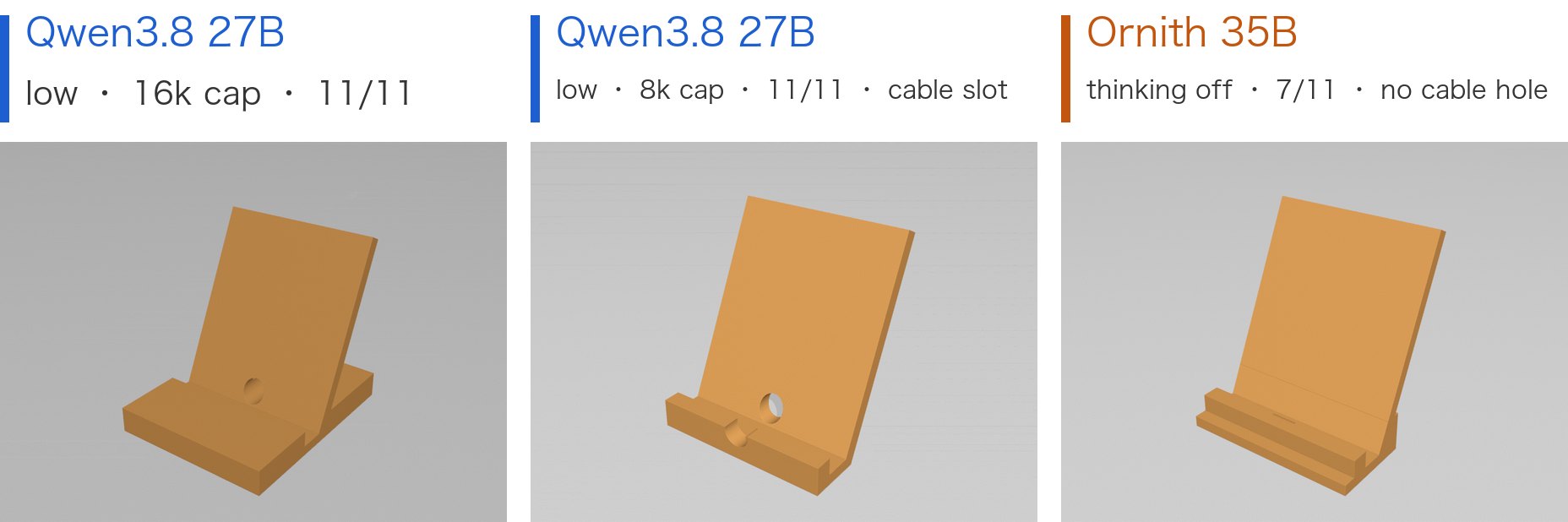
Online, the advice I could find for agent work mostly lands around 5,000–8,000 thinking tokens. I couldn’t find an official recommendation from Qwen for this kind of use, so I tested it. I re-ran the four tasks that had hit the cap, once each, with the low cap at 8,192:
| Task | Cap 16k | Cap 8k |
|---|---|---|
| K2 | 35/35 · 10 min · 27.8K tokens | 35/35 · 16.5 min · 43.9K tokens |
| M1 | 11/11 · 26 min ⏱ | 11/11 · 26 min ⏱ |
| M2 | 22/22 · 21 min · 54.1K tokens | 22/22 · 15 min · 39.1K tokens |
| M3 | 0/23 · 28 min ⏱ | 0/23 · 26 min ⏱ |
No score moved. Time was a mixed bag: M2 got six minutes faster, and K2 got six and a half minutes slower. My guess is that when a thought gets cut off, the model sometimes just starts another one. One run per task can’t tell you more than that.
So the honest claim is narrow: halving the cap cost nothing in score here, and it caps how long any one stuck step can last at about four minutes instead of eight. That’s enough for me. I now run low 8,192, medium 12,288, high 16,384, in the benchmark, in my everyday DSH setup, and as Splash’s own default. In DSH it’s a few lines in the provider config:
thinkingBudgets:
  low: 8192
  medium: 12288
  high: 16384
compat:
  supportsThinkingTokenBudget: true
Two bugs that mirror each other
Qwen, W3 at low effort. The task asked for data-testid attributes on the results so the checker could find them. Qwen added them, and then its own JavaScript looked those elements up with getElementById, by an id it never set. Every lookup came back empty, and every amount on the page showed a dash. It never opened its own page to look. At high effort it got it right first time.
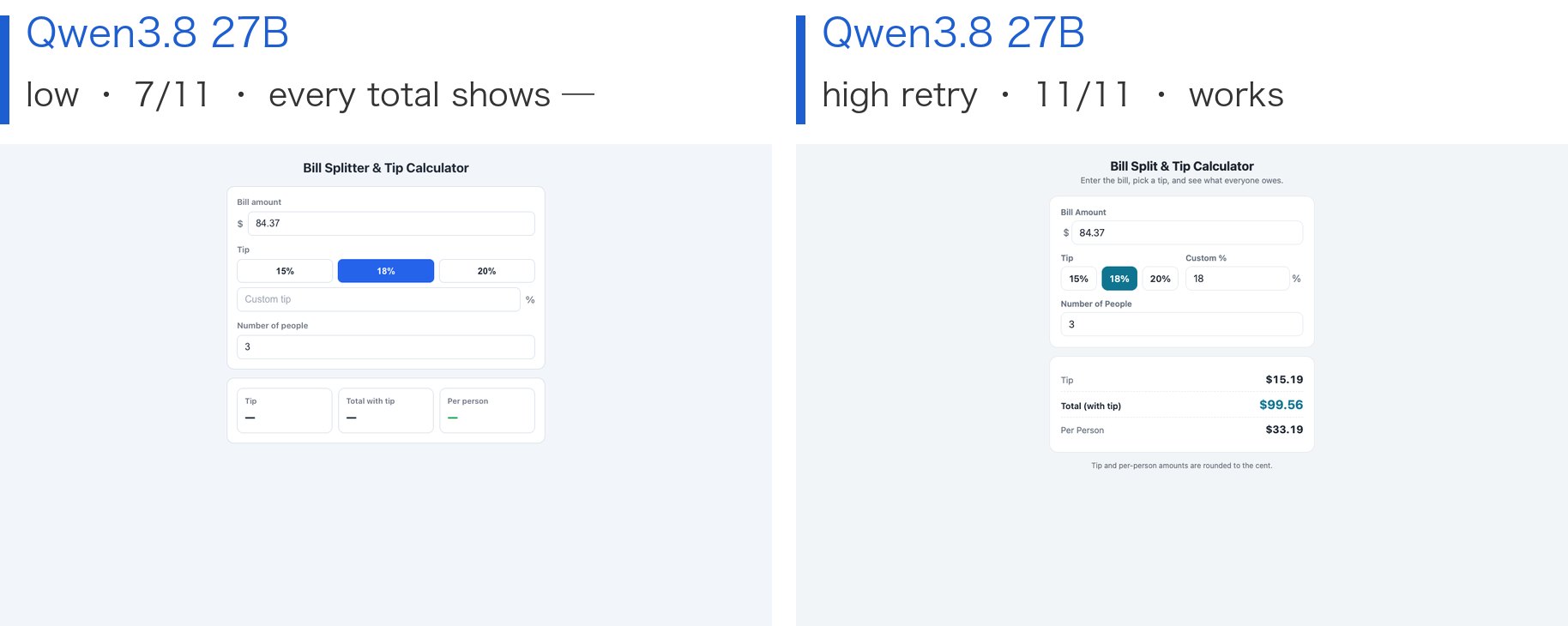
id it never set, so every total shows a dash. Right, the high retry: works.Ornith, W2. The exact opposite. It wrote plain ids where the task said data-testid, so the checker couldn’t find a single element and scored it 4 of 15. Out of curiosity I copied the page and changed only the attribute names: the thinking-off version then passed 15 of 15. The app worked fine; it just didn’t follow the instructions. (The thinking-on version had a real bug as well: ticking an item didn’t mark it done.)
That’s a fair caveat on Ornith’s W2 score, and it’s also exactly what I care about when I hand real work to a model. “Works, but not the way I asked” means I have to check everything.
Looks are a separate question
The checkers only test whether things work. For the web apps, the 3D parts and the deck I also wanted a looks score, 0 to 3. I asked Claude to do it blind: the screenshots were relabelled A, B, C in random order, and the answer key was opened only after all 17 were scored.
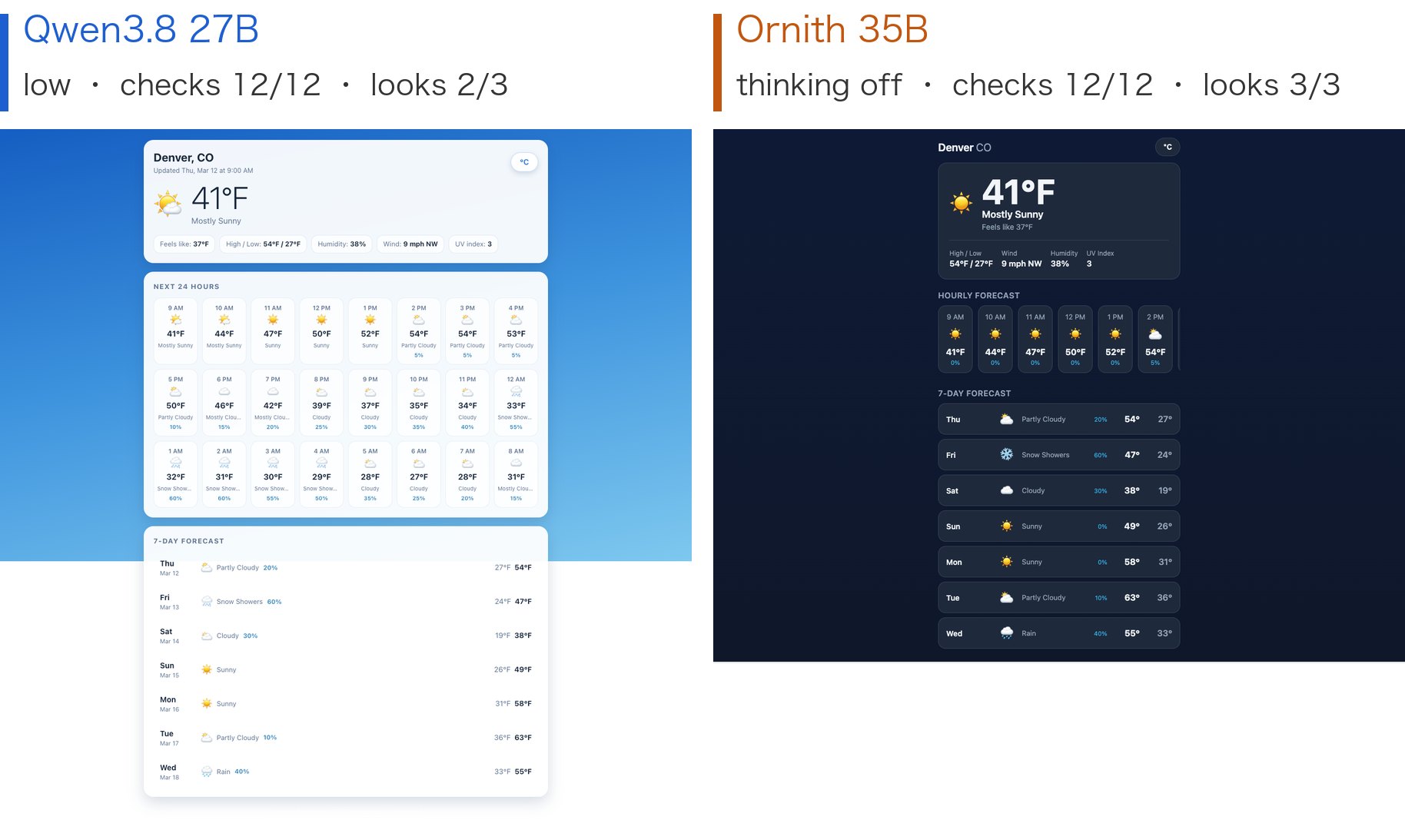
The best-looking page of all was Ornith’s weather app, a dark, iOS-style layout that scored 3. Qwen’s was clean but plainer and scored 2. Ornith’s best really is better than Qwen’s best.
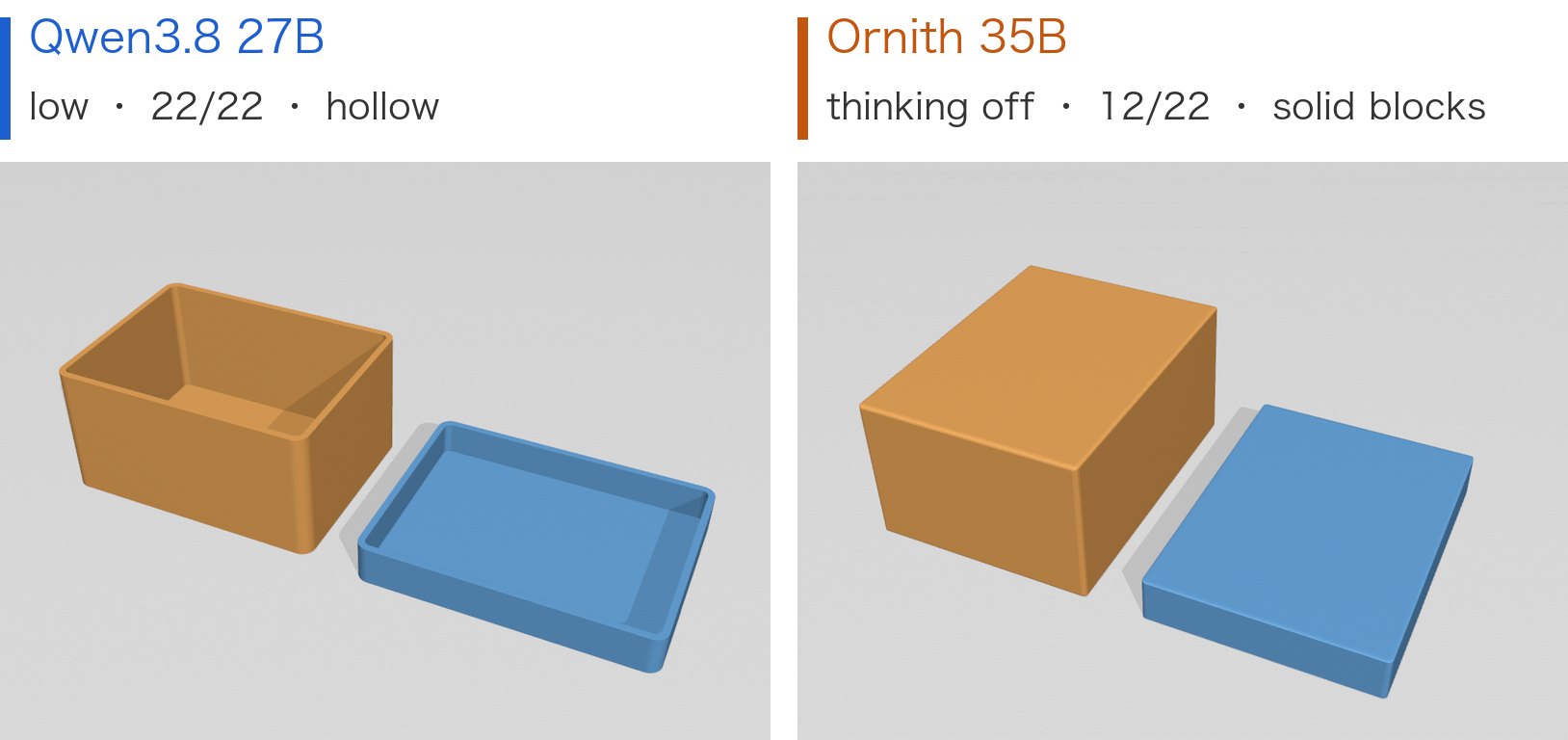
But Ornith was uneven. Its storage box and lid looked tidy in the render, and both were solid blocks, with no inside to store anything in:
And its slide deck, which passed every check (10/10), won’t open in PowerPoint: “Sorry, PowerPoint can’t read” it. Keynote opens it, and so does the Python library the checker uses, which is why the checker passed it. The reference deck, in the same folder, opens fine, so it isn’t a permissions issue. I haven’t found which part of the file PowerPoint rejects yet, but it’s a hole in my checker: “the numbers are right” isn’t the same as “my boss can open it”.
My own mistakes
As in every episode, Claude set this up and ran it with me, and not everything went right:
- The first pass was thrown out. The harness loaded my personal skills, and one of them pointed the model at my real notes vault. In P2 it read my actual ledger instead of the task’s copy. (It also tried to copy a file into the vault; the sandbox blocked that, and nothing in the vault changed.) Same lesson as #2: read-only doesn’t mean “only this folder”. Every run since uses an empty skills folder, and the runner now flags any file access outside the task folder.
- Ornith started on the wrong rule. Its config said “thinking high”, so its first attempt ran all twelve tasks at high, against my own “cheap first, retry only failures” rule. I noticed partway through the first task, we stopped it, deleted it and started over.
- A logging error. For a while the results recorded Splash’s default thinking cap instead of the cap actually sent with each request, so the two high-effort runs showed 16,384 instead of 30,720. Fixed, and the records were corrected.
- oMLX wouldn’t quit. When switching engines, the oMLX menu-bar app ignored the quit command and kept its server running. The script refused to start Splash while the port was busy, which is exactly what it should do, but it means my “never run both engines” rule depended on that check.
Limitations
- Each cell is one run. No repeats, so a single lucky or unlucky run can swing a row.
- I wrote the tasks and the checkers. The P3 checker already has a known hole.
- The looks scores are one judge’s taste, and that judge is Claude, not me.
- The two models’ thinking settings aren’t symmetrical: Qwen’s thinking has a cap, and Ornith’s (on oMLX) has none.
- Ornith’s 13-minute limit is fair in tokens, but may be tight for the 3D tasks, where Blender itself takes real time.
My verdict
- For real work on this Mac, Qwen3.8 27B is the one I trust. It was right on 11 of 12, and when it was wrong, it was usually “never finished”, not “finished and wrong”.
- Ornith is worth keeping for quick, small jobs where I’ll look at the result anyway. A two-minute weather app that looks this good is not nothing.
- Don’t reach for more thinking first. On both models, more thinking mostly bought more time spent stuck. Turning the cap down cost nothing.
- If you run Qwen in a harness, try a thinking cap around 8K.
What’s next
- The Lab page on this site becomes this table: models across, tasks down, and every cell opens what the model actually made.
- Any new local model gets the same twelve tasks, same rules, same machine.
- The gears: would one line in the prompt, “write the script first, then check it”, be enough? That’s a small experiment for next time.