In the last episode I got Qwen3.8 27B fast and stable. This time it gets a different kind of job: not a question, but something you can open. I gave it one sentence:
can you make a ppt about the spending for Oct using the data in this vault?The first deck surprised me. The colors, the cards, the charts, the slide titles that state the takeaway: it all looked like a real deck. Honestly, it felt like Opus 4.6.
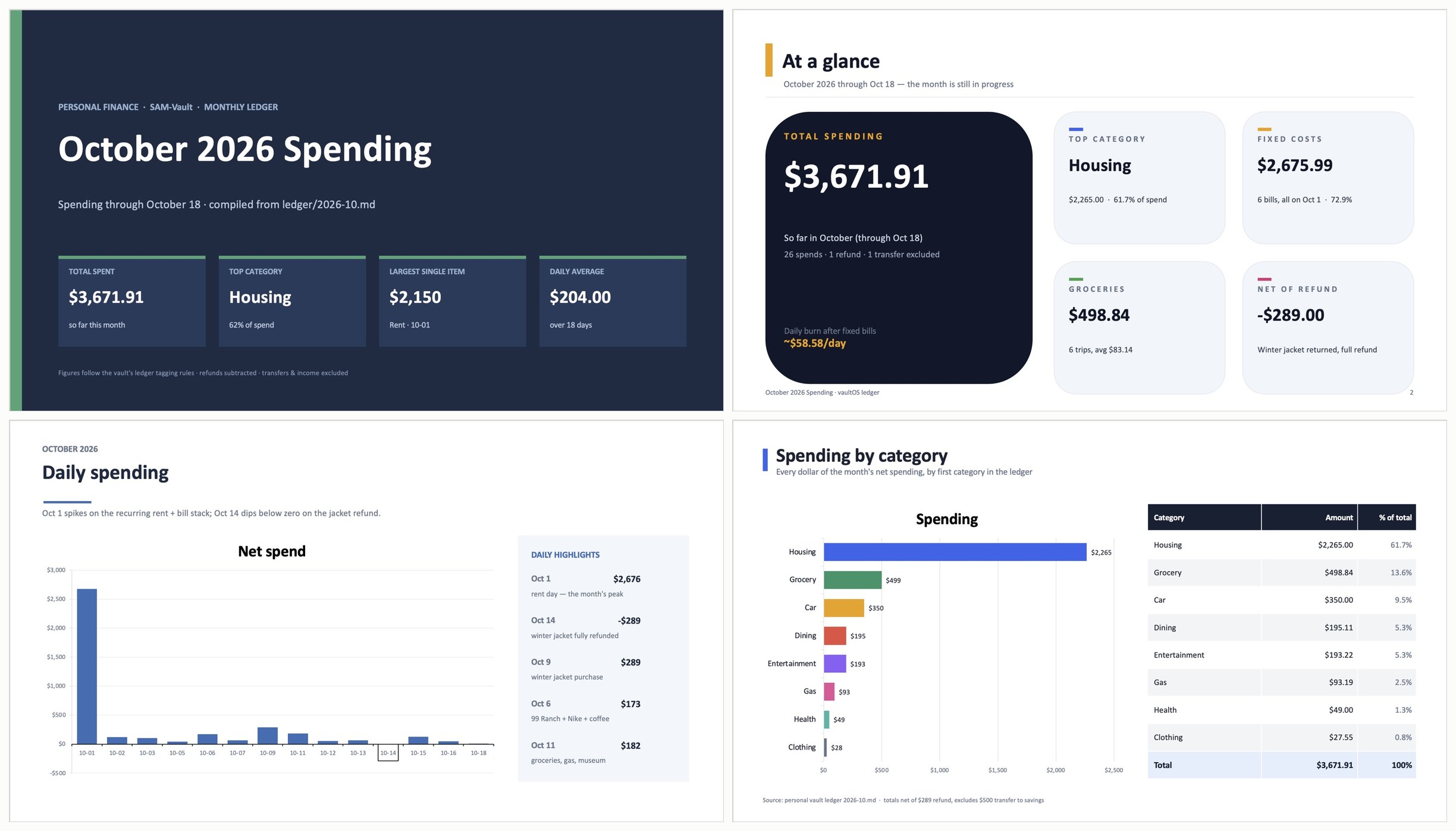
Looking good is one thing. I still wanted to know two things: are the numbers right, and was this a fluke? So I ran the same prompt six times, went through every deck slide by slide in PowerPoint, and recomputed every number from the ledger. ("It felt like Opus 4.6" is my impression. I didn't run the same prompt on Opus to compare.)
The setup
- Environment: the same Apple Silicon Mac (M5 Pro) with 48GB of memory, DeepSeek Harness 0.2.1-rc.3, and oMLX 0.7.2. The model is last episode's pick, Qwen3.8-27B-oQ4e-mtp, with thinking set to low.
- Data: the notes of Sam Lin, who doesn't exist. October's ledger runs to the 18th, 28 rows, with the usual traps: a transfer into savings, a jacket that was bought and returned, and a
tags.mdthat spells out the bookkeeping rules. - Rules: a new session every time, Standard mode, write access (it has to save a deck). The prompt never changed. I didn't say where the files were or mention the rules. Before each run I moved the previous run's output out of the vault so it couldn't see it.
- Scoring: before the later runs, I wrote one checklist and scored all six decks against it. The correct answers come from a script run on the ledger.
Design: six runs, six looks
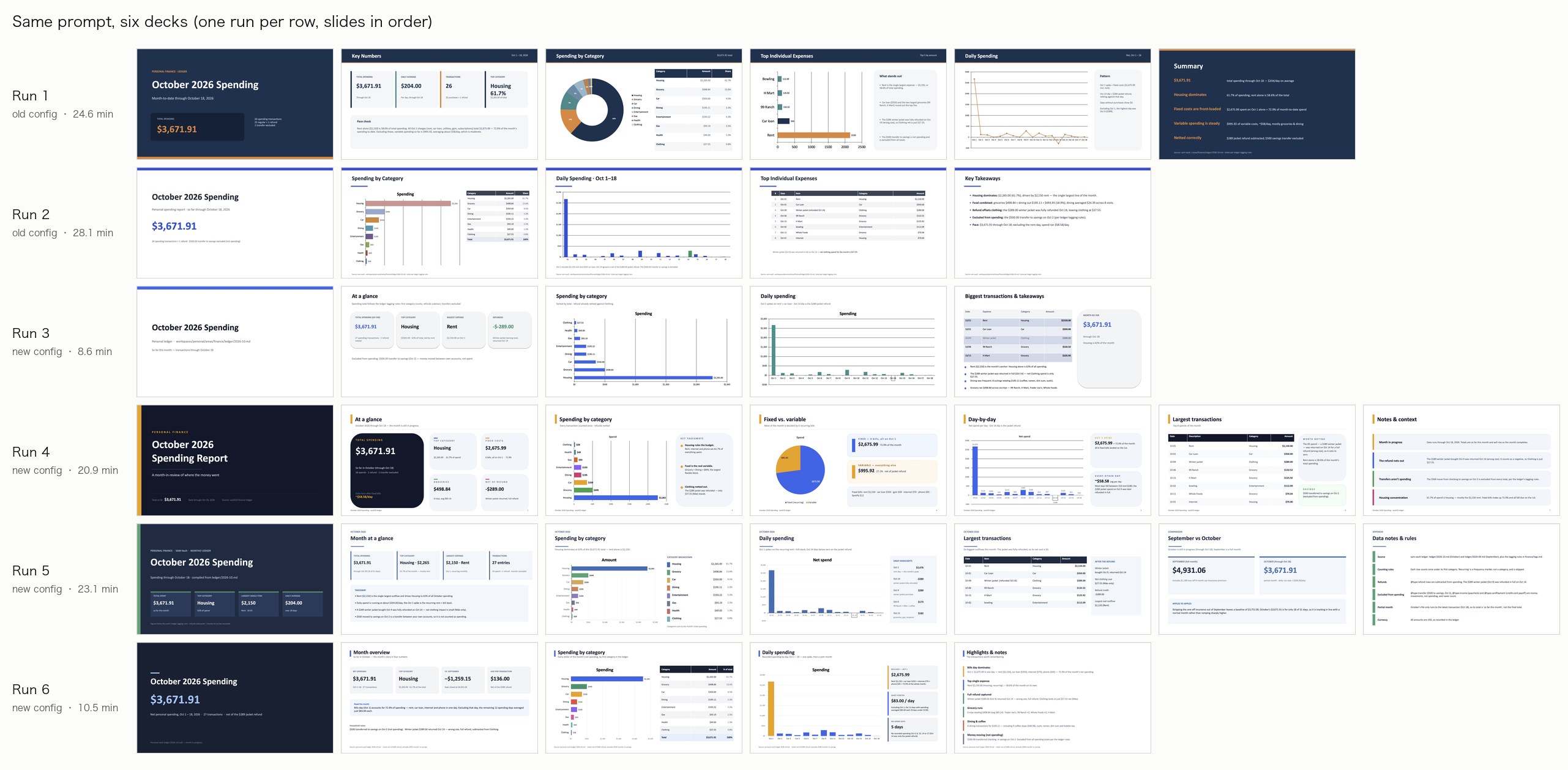
Each row is one run. No two decks are alike, but they share a few things:
- Every deck has a complete visual system. Consistent colors and type sizes, with a clear difference between the cover, the content slides and the summary.
- The charts are native PowerPoint charts, not pasted images, so you can open them and edit the data. Donut, bar, column, pie and line charts all show up.
- Almost every deck has big number cards: total, top category, largest single item, daily average.
- Slide titles state the takeaway, like "Housing dominates at 62% of the $3,671.91 total" and "one spike, then a calm month".
- It adds details on its own. For the returned jacket, run 3 grayed out that row in the table, and runs 2 and 5 marked it "refunded". Run 5 even added an appendix slide listing the bookkeeping rules one by one.
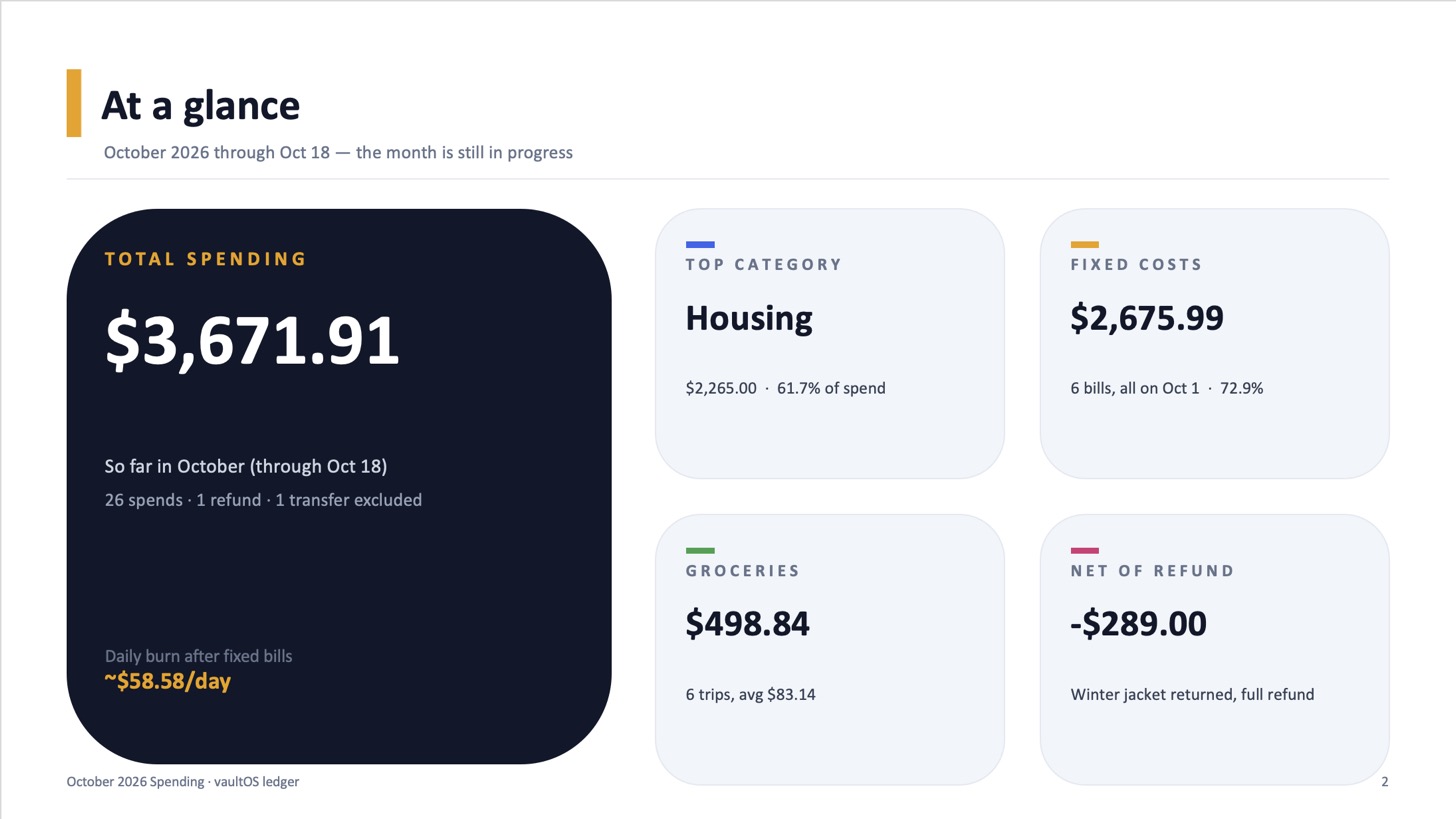
Run 4 is my favorite: one dark main card and four small ones, with the color, spacing and hierarchy all where they should be.
What surprised me most: it can't actually see the decks it makes. In this harness the model takes text only, so every layout was written "blind" in python-pptx code, and afterwards it could only check with code that the data landed in the right place.
Not everything is good. Run 1's daily line chart lets October 1st's $2,676 set the scale, flattening every other day into a line along the bottom. Run 2 drew the October 14th refund as a green bar going up, which at a glance looks like money spent that day. Several decks put a pointless title above the chart. And the colored strips on the left edge of cards and the short rules under titles have an AI-generated feel. All of these are easy to spot and quick to fix.
Are the numbers right?
| Run | Factual errors | Misleading claims | Format / source |
|---|---|---|---|
| 1 | 1 | 3 | 1 |
| 2 | 0 | 0 | 0 |
| 3 | 0 | 0 | 2 |
| 4 | 0 | 0 | 1 |
| 5 | 0 | 1 | 0 |
| 6 | 2 | 1 | 0 |
The core numbers were right in all six. The $3,671.91 total, the amount and share for all 8 categories, and every day's figure. The refund was netted out every time, the transfer was excluded every time, and every deck said the data runs through October 18th.
This matches what I saw in episode two. In the run logs, all six runs found and read tags.md on their own, then had a Python script compute the numbers from the ledger, and all six reopened the finished deck to check the data inside. Run 1 even caught one of its own bugs that way: the bar chart had been filled with category names instead of amounts.
The mistakes were all in the conclusions, and each run made different ones:
- Run 1 wrote the count as "26 = 25 purchases + 1 refund". It's actually 26 purchases plus 1 refund.
- Run 1 said "apart from October 1st, the biggest day was October 9th ($289)". That $289 is the jacket that was later refunded in full.
- Run 6 wrote "rent + car loan + internet + phone = 72.9%". It left out the gym and Spotify; those four items only add up to $2,615.
- Runs 5 and 6 both added a "September vs October" comparison on their own, putting the first 18 days of October against all of September. Run 5 even labeled it "APPLES TO APPLES" and concluded October was "in line with a normal month". Over the same period (the 1st to the 18th, minus September's one-off car insurance payment), October is actually about 8% higher.
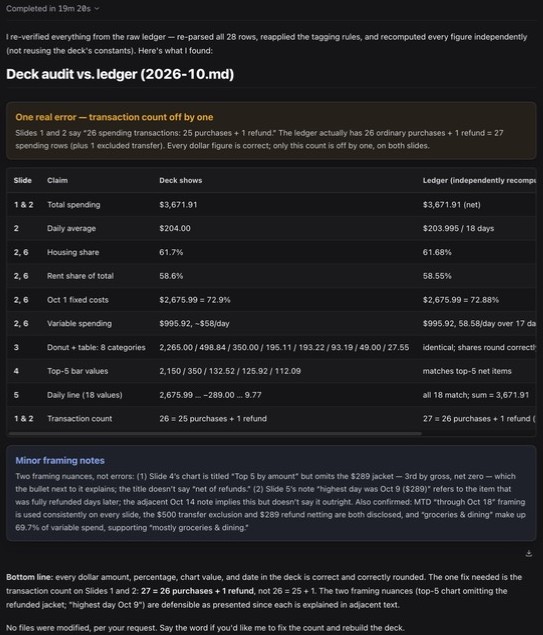
In run 1's chat I also asked: "Is every number right? Is anything misleading?" It took 19 minutes and found the count error. It noticed two of the misleading claims but decided they were "defensible". The interesting part is how it found the count: only after writing a new script that printed purchases: 26 and refunds: 1 separately. When it simply reread the slides, it checked off the wrong count a second time.
Where the time went: one harness setting
Run 1 took 24 minutes 36 seconds. The log showed that almost a third of that wasn't work at all. It was context compaction: once the context passed about 30K tokens, the harness compacted after nearly every step, and 11 of the 20 compactions failed. Less obvious: each compaction rewrites the start of the conversation, so the next step loses its cache and has to reread more than 20K tokens. Steps like that took one to three minutes each.
The cause was a setting from the last episode. I had set the harness context to 131,072 with 32,768 for output and assumed matching the limits was enough. But the harness's compactor also holds back 65,536 tokens of headroom, which leaves a trigger point of 131,072 − 32,768 − 65,536 = 32,768.
That headroom lives inside the Standard preset, so changing the compaction plugin's config directly does nothing (I tried, and burned a 28-minute run). What you can change is the model's context window. I raised Qwen's from 131,072 to 172,032, which moves the trigger to 73,728, out of reach for a job like this. And 172,032 + 32,768 is exactly oMLX's 204,800, so last episode's rule still holds.
| oMLX context / output | Harness context / output | Compaction trigger | |
|---|---|---|---|
| Last episode | 204,800 / 32,768 | 131,072 / 32,768 | 32,768 |
| Now | 204,800 / 32,768 | 172,032 / 32,768 | 73,728 |
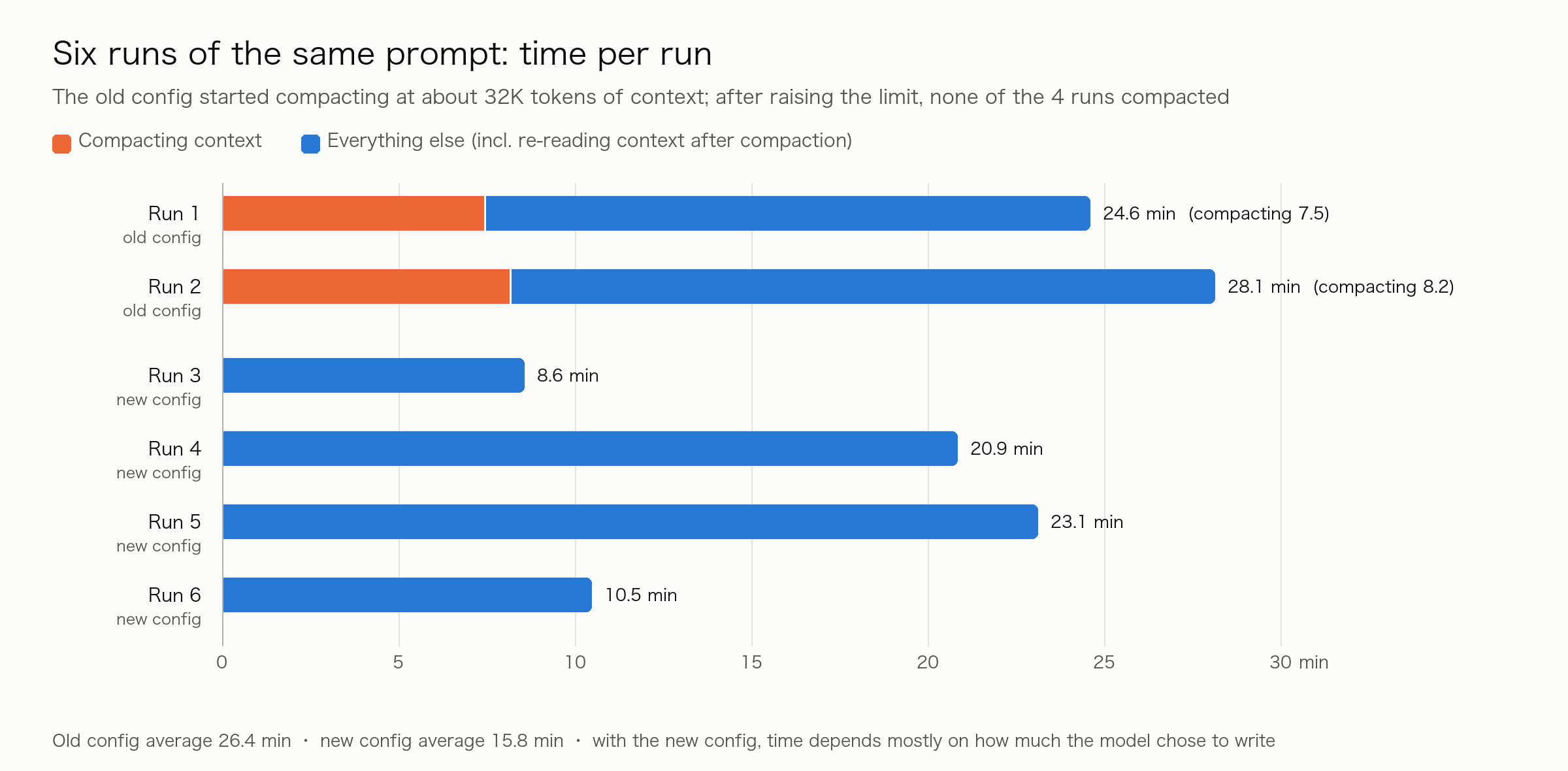
None of the four runs after the change compacted. Average time fell from 26.4 minutes to 15.8. Per thousand generated tokens it fell from 1.21 minutes to 0.64, roughly twice as fast. Accuracy didn't get worse: both configs averaged 0.5 factual errors per run. With the new config a single run took anywhere from 8.6 to 23.1 minutes, depending mostly on how much the model decided to write: 5 to 7 slides, with or without a September comparison.
What I take from it
- The design really is a surprise. From one sentence, a local 27B reliably produces decks with a full visual system, native charts and titles that state the takeaway.
- The core numbers can be trusted. It finds the rules itself, computes with code and checks its work; the total, categories and daily figures were right in all six decks.
- The conclusions need a human. How an average is defined, comparisons across months, breakdowns of a total: any of these can go wrong in any run, and never the same way twice.
- How I'd use it: ask it to include a table showing where every number comes from; when you ask it to check its work, say "recompute it with a script", not just "check it"; and look over the layout yourself.
- Check your harness's compaction trigger. Changing one number made the average run 40% faster.
Limitations
The old config ran only twice and the new config four times, so the samples are small. Scoring covered the text only, not the layout. I wrote the checklist myself, and the data is fake data in my own format, with only 28 rows for October. I didn't run the same prompt on a cloud model, so "it felt like Opus 4.6" is only my impression. Everything comes from one machine.
Last word
After this experiment, I've slowly come around to thinking local models can do some genuinely useful work. Next I'll keep testing, with experiments like having it create and edit PDFs. Stay tuned.