I gave the same job to two AI coding agents: build a complete, interactive web page from scratch, in one HTML file. Claude Opus 5.5 in the cloud finished in 30 minutes, first try, every check passed. Qwen3.8-27B running locally on my 48 GB MacBook got there too, but only after nearly six hours across two days, four nudges from me and one change to the harness settings.
The local model wasn’t slow because it couldn’t write the page. Once it actually started writing, it needed about an hour. The rest went into three walls that anyone running a local model in an agent harness is likely to hit:
- The harness’s 5-minute idle timeout. The local server sends nothing while the model writes a big file, so the harness decides the connection is dead and throws the work away. It happened 7 times.
- Thinking. With no cap, the model spent its whole output budget thinking and never wrote a line. With a cap, it finished thinking, said “now I’ll write the file”, and stopped.
- Research. It spent 45 minutes reading web pages to verify data. The downloads themselves took seconds; the reading and thinking took the rest.
Below is what happened, what fixed each wall, and how the two pages compare. You can also try the page the local model built: open Qwen’s page and hit 起卦 (Cast), or switch it to English first.
The task
The page is about the Bagua, the eight trigrams of the I Ching, the ancient Chinese book of divination. You toss three coins six times. Each toss gives one line, solid or broken, and six lines stacked from the bottom up make one of 64 hexagrams, each with a traditional reading. You don’t need to know any of it to follow this post. What matters is that the task combines three things that are hard to get right together:
- Fixed data that must be exact. Eight trigrams and 64 hexagrams, each with set names and pairings. A checker holds the ground truth, and a beautiful page with wrong data fails.
- Real logic. Three coins per toss, heads 3, tails 2. The sum (6, 7, 8 or 9) decides the line, and some lines are “moving”, which flip to give a second hexagram. Each line has to come from an actual random toss, with animation, not a precomputed answer.
- Two languages and a polished design. Everything in Chinese and English, a language switch, an “elegant dark scholarly” look, and a layout that works on a phone. All of it in one
index.html, with no external libraries or fonts.
This is the one task I left out of Lab #6, where the same two models went head to head on ten everyday jobs, because the local model had failed it three times. The prompt was one sentence, “Do what TASK.md says”, word for word for both models. The checker opens the page in headless Chrome, clicks the buttons and casts for real: 19 checks in all.
The two setups
| Local | Cloud | |
|---|---|---|
| Harness | DeepSeek Harness 0.2.1 desktop | Claude Code desktop |
| Model | Qwen3.8-27B, 4-bit (oQ4e), with MTP | Claude Opus 5.5 |
| Runs on | M5 Pro, 48 GB, oMLX 0.7.3rc1 | Anthropic’s cloud |
| Thinking effort | low | xhigh |
| Thinking cap | none on day one; 8,192 tokens on day two | default |
| Max output per reply | 32K tokens | default |
| Harness idle timeout | default 5 min; raised to 30 min midway through day two | default |
Results
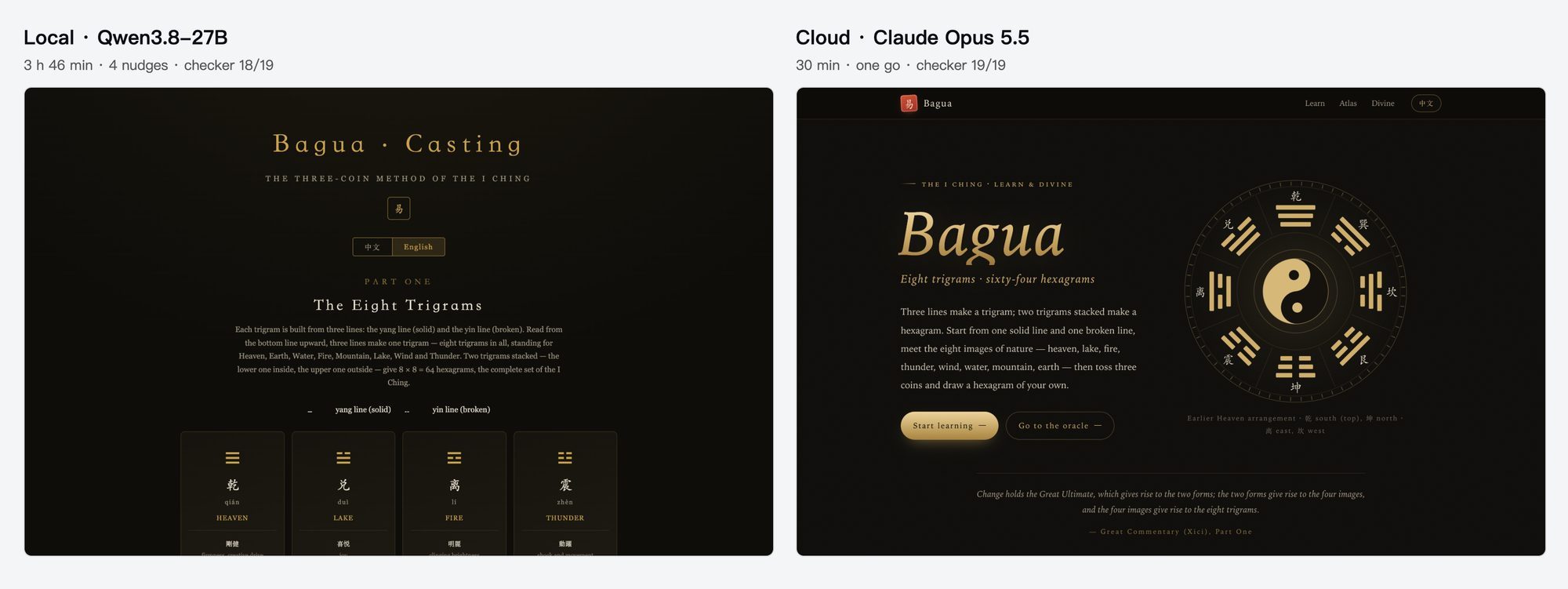
| Local Qwen3.8 | Cloud Opus 5.5 | |
|---|---|---|
| Delivered | ✅ on day two | ✅ first try |
| Checker | 18/19 (the one miss is the checker’s fault, see below) | 19/19 |
| Time | ~2 h of failed attempts on day one + 3 h 46 min on day two | 30 min |
| What I had to do | nudge it 4 times and change a harness setting | nothing |
| Page size | 40 KB | 107 KB |
Both pages get the data right. Trigram pairings, which six lines make which hexagram, the changed hexagram: the checker verified all of it. Before handing over, Qwen even wrote its own test scripts that force all 64 hexagrams and check each one, and those tests caught a bug of its own (it flipped the moving lines the wrong way), which it fixed.
The gap is in how much each built, and in the details. Here’s the casting result:
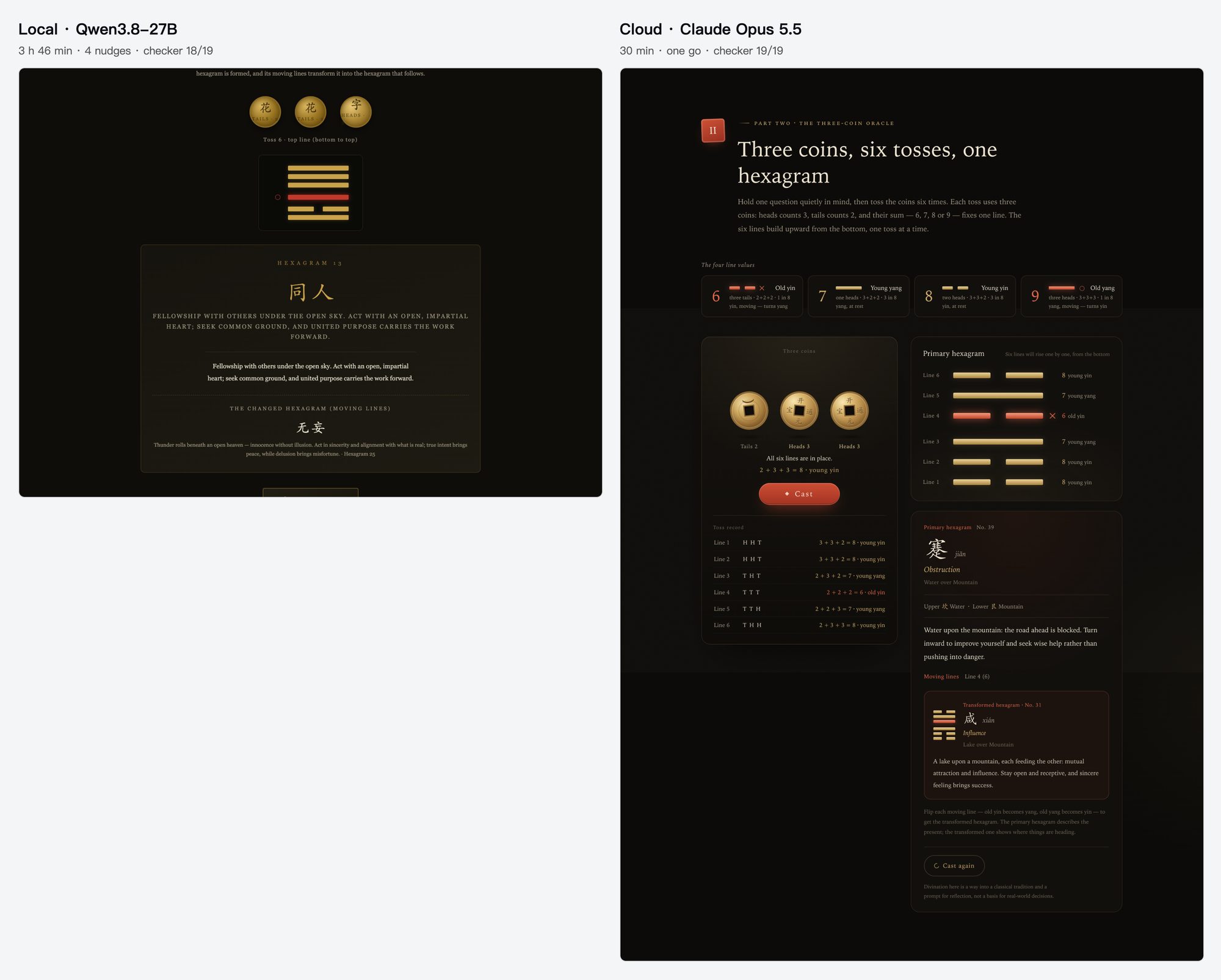
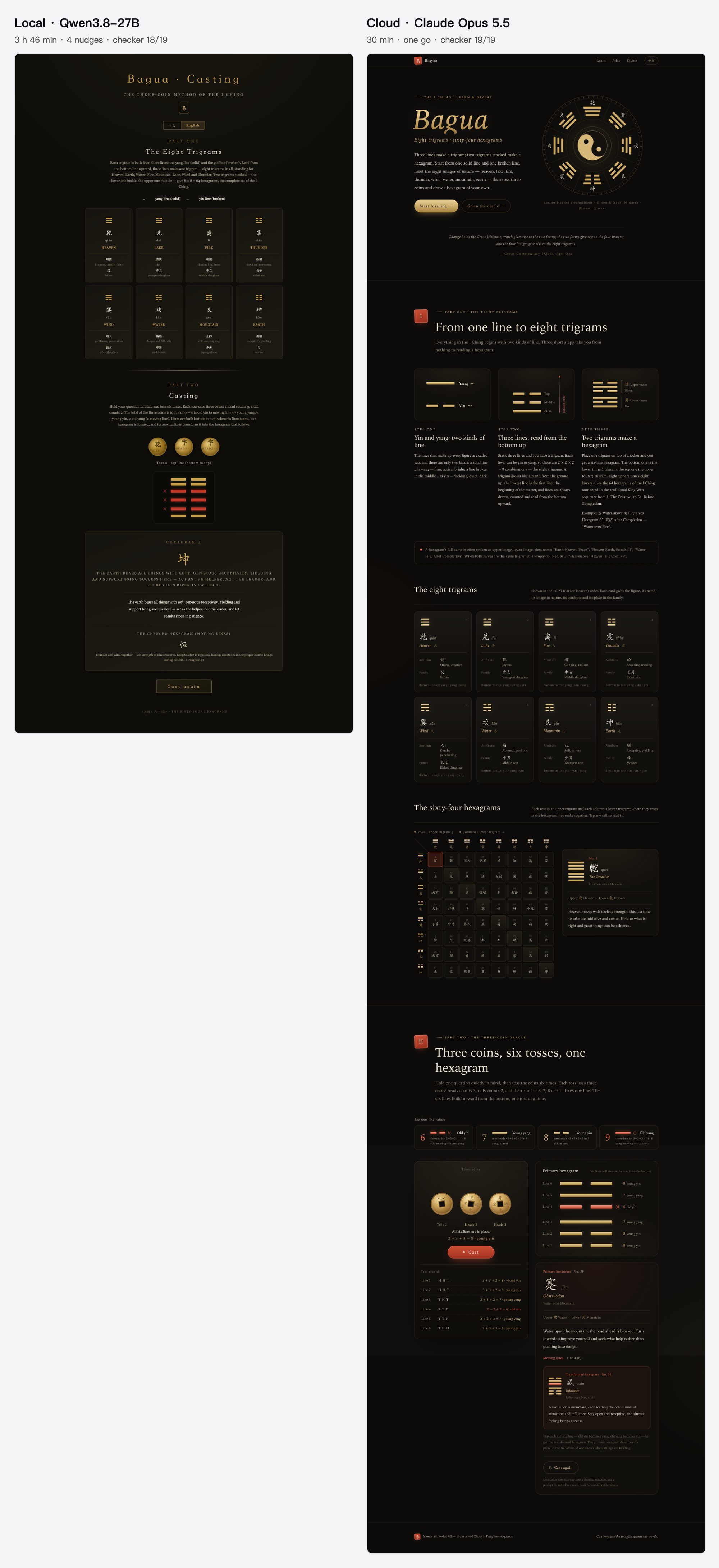
Opus added a lot that the task didn’t ask for but a beginner actually needs: a Bagua wheel on the first screen, a three-step illustrated walk from one line to three lines to sixty-four hexagrams, a full 64-hexagram table (click any cell for its reading), a toss log (which faces came up and the sum for every line), cards explaining the four line values, a breakdown of the primary hexagram into its upper and lower trigrams, and a closing note that divination is for reflection, not real-world decisions.
Side by side, full length, the difference is plain:
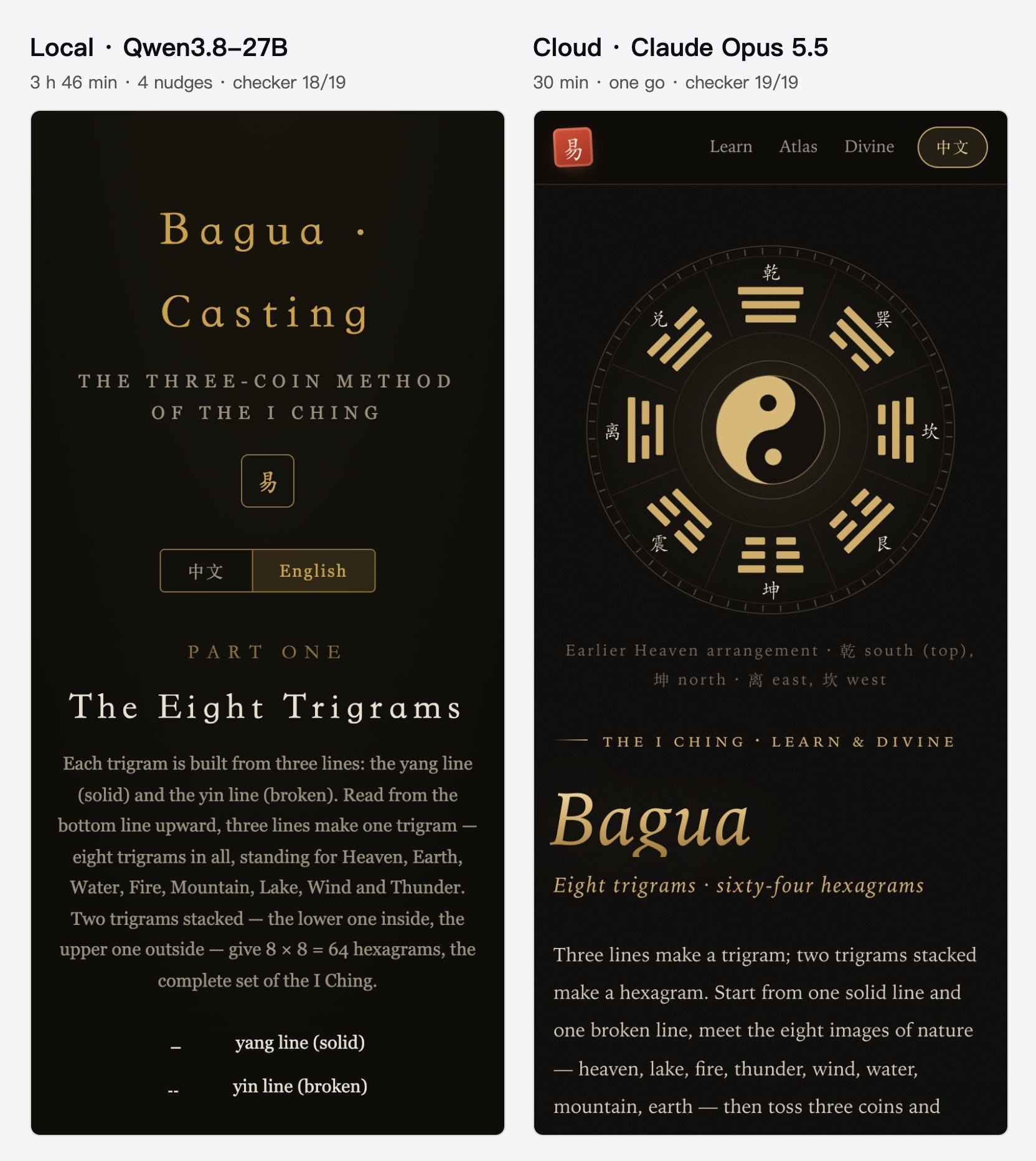
Both work on a phone, with no horizontal overflow:
What the checker didn’t catch
- The one failed check isn’t Qwen’s fault. The checker finds the language switch by looking for the first button whose text matches. Qwen built two buttons, “中文 | English”, so the checker clicked “中文”, which was already selected, and nothing changed. Clicking English by hand switches the whole page correctly.
- English leaks into the Chinese page. In the default Chinese view, the beginner explanation is empty; it only shows text after you switch to English. In a casting result in Chinese mode, the main reading starts with a block of English in capitals, and the changed hexagram’s reading is entirely in English.
- The English reading appears twice. In English mode the same reading is shown once in capitals and once in normal case.
- Small stuff. HEADS/TAILS on the coins is clipped, and the yin/yang line legend is almost too small to see.
None of these show up in a script. A person has to look.
Where the local model’s time went
Day two’s successful run took 3 hours 46 minutes, roughly like this:
| Where | About |
|---|---|
| Checking the 64-hexagram data on the web | 45 min |
| Harness timeout: the same file killed and rewritten 7 times | 75 min |
| Context compaction (6 times) | 25 min |
| Finished thinking, then stopped, waiting for me to nudge (3 turns) | 15 min |
| Reading the task and planning | 15 min |
| Actually writing the page, testing and fixing it | 50 min |
Only about an hour was real work. The rest was avoidable. One wall at a time:
Wall one: the harness’s 5-minute timeout
While DeepSeek Harness waits for the model, it runs a timer: if nothing new arrives for 5 minutes, it assumes the connection died, throws the reply away and starts over. A cloud model writes a file in tens of seconds and never gets near that line.
Locally it’s different. For this page, Qwen has to generate well over ten thousand tokens in one file, at roughly 25 tokens a second: several minutes. And the local server, oMLX, holds the whole tool call back until it’s finished, sending only keep-alive heartbeats in the meantime, which DSH’s timer ignores. So every time the write passed the 5-minute mark, DSH hung up and Qwen started the file again from scratch. That’s what killed day one, and on day two it happened 7 more times.
The fix is one setting: raise streamIdleTimeoutMs on DSH’s oMLX route to 30 minutes. I’m not the only one: since August, DSH’s GitHub discussions have had a steady stream of Ollama and llama.cpp users reporting the same 5-minute cutoff (#3157), and someone found a second 300-second limit in the networking library underneath (#8947). Other harnesses (opencode, hermes-agent and more) have hit the same thing. Harness defaults are tuned for cloud speeds; with a local model you have to change them yourself.
Wall two: thinking too much, or thinking and then stopping
On day one, once the timeout was raised, Qwen found a different way to fail. It wrote the Chinese and English reading for each of the 64 hexagrams in its head first, spent the entire 32K output budget on thinking, and hit the limit without writing a single line to the file. I added a line to the task telling it not to draft everything in its head first and to write the file in parts. It did the same thing anyway.
On day two I set a hard thinking cap of 8,192 tokens in oMLX. No more runaway thinking, but a new problem: once its thinking was cut off, it said “Now I’ll write index.html” and ended the turn without writing anything. Three turns in a row.
I was simulating a real user, so whenever it stopped I said “继续” (“continue”). That alone didn’t help: each time it thought everything through again and got cut off again. On the fourth nudge I said this instead:
别再规划了,直接把 index.html 写出来。太长的话先写骨架,再分几次补完。 (Stop planning and write index.html now. If it’s too long, write a skeleton first, then fill it in over a few passes.)
Seven minutes later the skeleton existed. From there it filled in the content, wrote its own tests and fixed its bugs in one go, about an hour. With a local model, nudge specifically: say what to do now and how it can be split up.
Wall three: researching on the web
This one isn’t really Qwen’s fault. It’s a flaw in the task.
Its first move was to search. DSH’s search needs a DeepSeek API key, which I hadn’t set, so search failed. It fell back to guessing URLs: first the Wikipedia I Ching article (no hexagram table there), then Wikidata, trying API after API and writing queries. It found complete data for only 25 hexagrams and worked out the rest with Python scripts, cross-checking as it went.
I went through the logs: a dozen-plus downloads plus every other tool call took 36 seconds in total; the other 45 minutes were the model reading pages, thinking and writing analysis scripts. Every page it fetched was tens of thousands of characters to read, followed by ten or twenty thousand characters of thinking, at twenty-odd tokens a second. Each step took minutes.
The irony: the table Qwen spent 45 minutes verifying, Opus wrote correctly from memory without touching the web once.
Our mistakes
To keep this honest, a few confessions. Claude set this test up for me, and these two mistakes are its, which I didn’t catch:
- The task was the wrong one. It comes from a test library built to check whether a model gets domain data right, to catch pages that look great but have made-up data. To test whether a local model can build a web page, it should have been handed the hexagram table. Instead the local model spent 45 minutes on research, and the test stopped measuring web building.
- A fixed problem came back. The 5-minute timeout was found and raised on day one. But the config was restored after testing, and on day two the same problem cost another 75 minutes.
Take those two out and the local model needs something like 1.5 to 2 hours for this page. Still several times slower than the cloud, but nothing like six hours.
Also: each side ran once; thinking effort differed (Qwen low, Opus xhigh); and on the local side I once sent a stray message by mistake, stopped within seconds and not counted.
My verdict
A local model can build a working page with correct data from scratch, but it’s a long way from “hand it over and walk away.” For the same task, the cloud is “say one sentence and check back in 30 minutes.” Local is “know how to tune the harness, set a thinking cap, and say the right thing when it gets stuck,” and what comes out is noticeably simpler and rougher in the details.
If you want to use a local model for this kind of job, here’s what I learned:
- Raise the harness idle timeout. DSH’s default is 5 minutes, and a local model writing a big file will hit it. I use 30 minutes.
- Cap thinking somewhere between 8K and 12K tokens. Without a cap it can think itself out of budget; with one, be ready to nudge.
- Nudge specifically. “Continue” isn’t enough. Say “write it now, in parts if you need to.”
- Hand it the data; don’t make it research. Reading web pages is where a local model burns the most time.
- Look at the result yourself. Passing every scripted check doesn’t mean bug-free; English leaking into the Chinese page is something only a person notices.
Next time
- A test just for local models researching on the web: search vs fetch-only, on fact lookups, multi-source comparisons and recent news, measuring accuracy and where the time goes.
- A web page task that needs no research: spec and data all in the prompt, so it measures page building and nothing else.
- When Qwen4 lands, the same tasks, head to head.