PushSense had one gesture for its first nine releases: hold a key, speak, release, and the text lands where your cursor is. That order is fine when you know where the words go. It is awkward when you want to say something first and decide later, and it is silently wrong when the cursor is in the wrong box, which for me is about half the time.
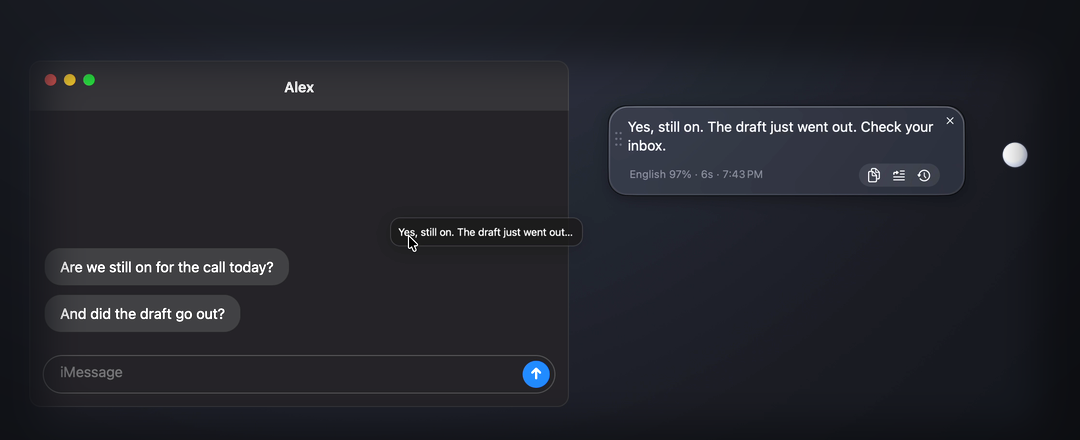
PushSense 0.2 adds a second gesture. A small pearl sits on your screen. Click it, talk, and the transcript waits in a glass bubble beside it. Then you drag the words into whatever window they belong in. I call it the buddy. This is the build log for it: what was hard, what was not, and what the release process caught.
The hidden step in every dictation app
Every voice-to-text tool I have used, including mine, types at the cursor. That hides a step you do before speaking: click into the right field. Miss it and your sentence lands in a search box, a terminal, or the wrong chat. The paid apps polish the transcription and stream words as you talk, and they all keep the hidden step.
The fix is not a better cursor. It is to stop typing for the user by default. Say it, look at it, then put it where it goes. That means the transcript needs to be a thing on screen you can pick up.
Native drag and drop was the easy part
I expected the drag to be the hard piece. It was one NSDraggingSession. The text in the bubble is a drag source that offers plain text; any window that accepts dropped text takes it: editors, chat boxes, browser fields, Terminal. Drop it on the Desktop and macOS turns it into a text clipping. I wrote none of that. AppKit did.
The interesting case is a window that refuses the drop. Some apps accept typed input but not drops. So when the drag ends with nothing accepted, PushSense clicks where you released and pastes. From the user's side the gesture is the same either way: drag, let go, words appear.
Picking the auto-stop icon took four tries
When you click the pearl to talk, the take ends on its own after 1.5 seconds of silence, or, if you switch that off, when you click again. That switch lives on a ring of small glass buttons that fans out when you hover the pearl, next to History and Menu. It needed an icon.
- Timer. First attempt. Read as a countdown or a stopwatch, and sat too close to the History clock. Two clocks on one ring.
- Magic wand. Distinct from the clock, but a wand promises "make it better", which is Smart mode's job, not this switch.
- Waveform with a slash. Accurate but unreadable at 18 pixels.
- Ear with a waveform. Listening for the pause is what the mode does, and the shape is unlike both the clock and the menu dots. That one shipped.
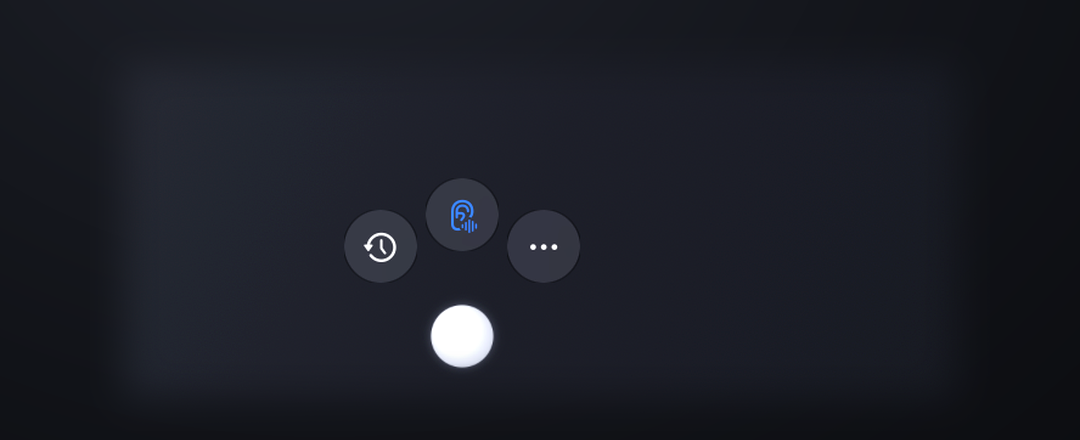
The lesson generalises: on a ring of three, an icon has to be different from its neighbours before it has to be precise.
A resting pearl is a still image
The first build animated the pearl all the time, a slow liquid breathing loop. It looked alive and it cost about 5% of a CPU core while doing nothing. A dictation tool that idles at 5% is a dictation tool people quit.
Now the pearl at rest is a still image. The liquid-metal orb only starts the moment you click, and stops when the take ends. Idle CPU went from about 5% to 0. The cursor-following halo from hotkey mode got the same treatment: it is created lazily the first time it is needed, so turning on Buddy mode never spawns the halo's WebKit processes at all.
The day transcription got slow, and why
Midway through the day, takes started coming back in three to four seconds instead of well under one. I assumed the buddy code was doing something expensive. It was not. I had a video-generation job running on the same Mac, and it had the GPU. Whisper's encoder, which runs on Metal, was queuing behind it: 3.5 seconds for the encode step under load, about 0.3 seconds once the GPU was free.
I mention it because it is the kind of thing a user will report as "the new version is slow", and the honest answer is: check what else is using your GPU. Nothing in 0.2 made transcription slower. Same model, same path.
Three bugs caught by clicking the app with a script
Before I cut the release I drove the app with synthetic clicks and key events: open the menu, toggle the buddy, start a take, switch modes mid-take, open history, switch the UI language, repeat. Not unit tests; a script clicking the real app. It found three things I had not seen by hand.
- A scrollbar covering text. When a transcript was long enough to scroll, the bubble's scroller sat on top of the last few characters of every line. Fix: lay the text out narrower by the scroller's width.
- A stray halo. Turning Buddy mode on while a hotkey take was recording left the cursor halo on screen forever, because the buddy branch of the idle handler never hid it. Fix: hide the halo on every idle, and move the indicator to whichever of orb or halo matches the take's current state.
- A duplicate key that crashed the Chinese UI. The localisation table is a Swift dictionary literal. Two entries had the same English key. In English nothing happens; with App language set to 中文, the dictionary initialiser traps on the duplicate and the app dies on launch. Fix: dedupe, and a check that fails the build if it happens again.
Three real bugs, one of them a launch crash for every Chinese user, found in about twenty minutes of scripted clicking. That is the cheapest testing I have ever done.
Showing what the language detector heard
Whisper decodes a take with one language token. On a sentence that mixes English and Chinese it has to pick one, and sometimes the whole sentence comes out in that language. PushSense already leans Chinese when Chinese is plausibly present. It will never be right every time.
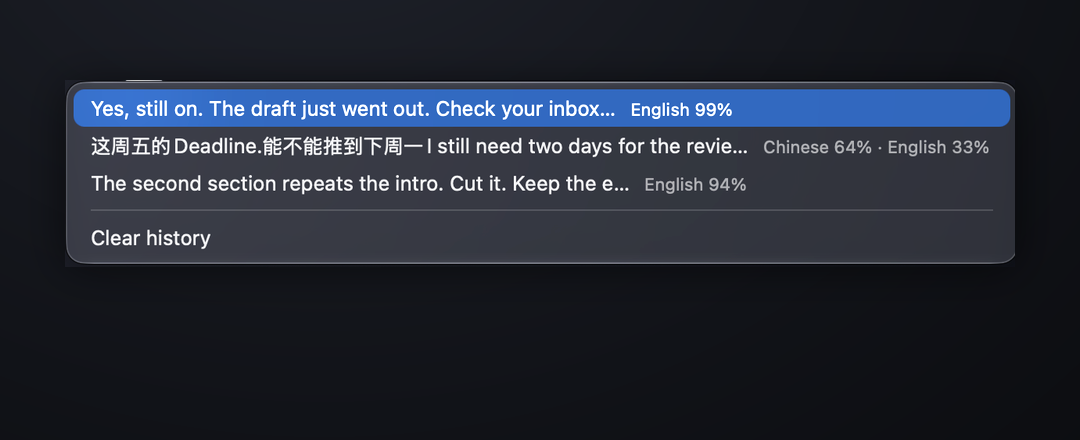
So now it tells you. The bubble's meta line and every history row carry what the detector heard, English 59% · 中文 39%, leader first. When a mixed sentence comes out in one language, that line is the reason. It does not fix the guess. It stops hiding it.
What is in 0.2
- Buddy mode, off by default: click the pearl to talk, auto-stop on silence, transcript in a draggable bubble.
- Hover the pearl for History (last 50 takes, stored in a JSON file on your Mac), the auto-stop switch, and the menu.
- The detected language mix on every take.
- Buddy output: keep takes in the bubble, or paste them into the focused app like a hotkey take.
- Hotkey takes are unchanged.
Free, signed and notarized, macOS 13 or later on Apple Silicon. Get the latest build, or watch the demo first. If a window refuses your drop, tell me which one; I keep a list.