I keep my life in plain Markdown files: a ledger per month, a portfolio note, a sleep and workout log, a list of projects. I wanted to know which questions about those files I can hand to a model running on my own Mac. I wasn't interested in a leaderboard score. I wanted to know whether I can ask "where did my money go this month?" and trust what comes back.
So I'm starting a series, Local Model Lab. Every episode asks the same seven questions, each one a different kind of task, about the same fake person's notes, and checks every number against an answer key. Each episode changes one thing: the model, the tools it gets, or its settings. That way the episodes can be compared directly, and when a new model comes out I can run the same questions on it.
This first episode sets the baseline with one model, Ornith 1.5 35B, and one rule: every answer has to come back as an interface I can check, with charts, tables and numbers rather than a paragraph.
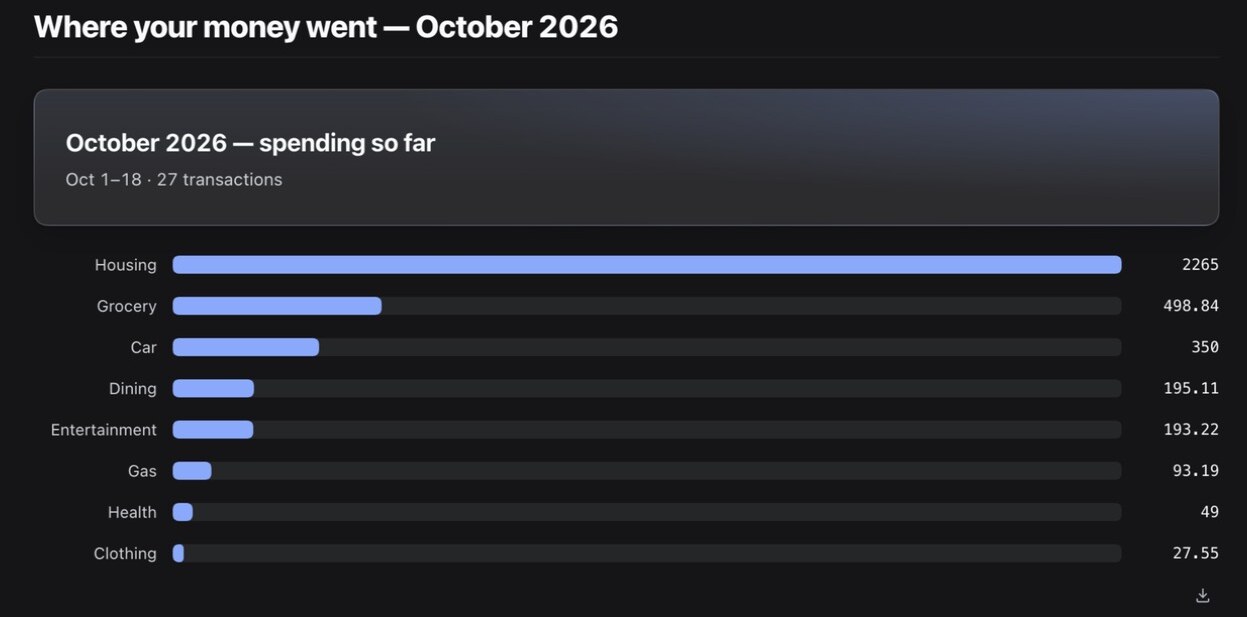
Short version: the local model is good at reading, following written rules and choosing a sensible chart. It is not good at arithmetic over many rows. The chart above is exactly right. The trend chart further down is not.
The setup
- Machine: an Apple Silicon Mac with 48GB of memory. Nothing leaves it.
- Model: Ornith 1.5 35B-A3B (4-bit). It's a mixture-of-experts model: 35B parameters, about 3B active per token, which is why it's fast on a laptop. Thinking was on.
- Harness: DeepSeek Harness 0.2.1-rc.2, a desktop agent app, pointed at the local model through oMLX 0.7.
- The UI part: dsh-genui 0.13.0, a third-party plugin that lets the model answer with stat cards, tables and charts instead of text. I read its source before installing it, and it never phones home.
The notes belong to Sam Lin, who doesn't exist. A script generates a year of his life in the same file formats I use: about 28 transactions a month, ten holdings, two months of health logs, six projects. Because the script writes the data, it also writes the correct answers, and it keeps them outside the folder the model can see. I also planted traps: a $500 transfer to savings that isn't spending, a jacket bought and fully refunded, a paycheck and credit-card payments that would double any naive total, and an out-of-date section in the project list.
Each question was typed once, in a fresh session, with the agent in read-only mode. I didn't add "please make a chart". Deciding to show a UI was the model's call.
Seven questions, seven kinds of task
| Task type | Question | Time | Result |
|---|---|---|---|
| Apply written rules to a month of rows | Where did my money go this month? | 1:20 | ✓ all 8 categories, transfer excluded, refund netted out |
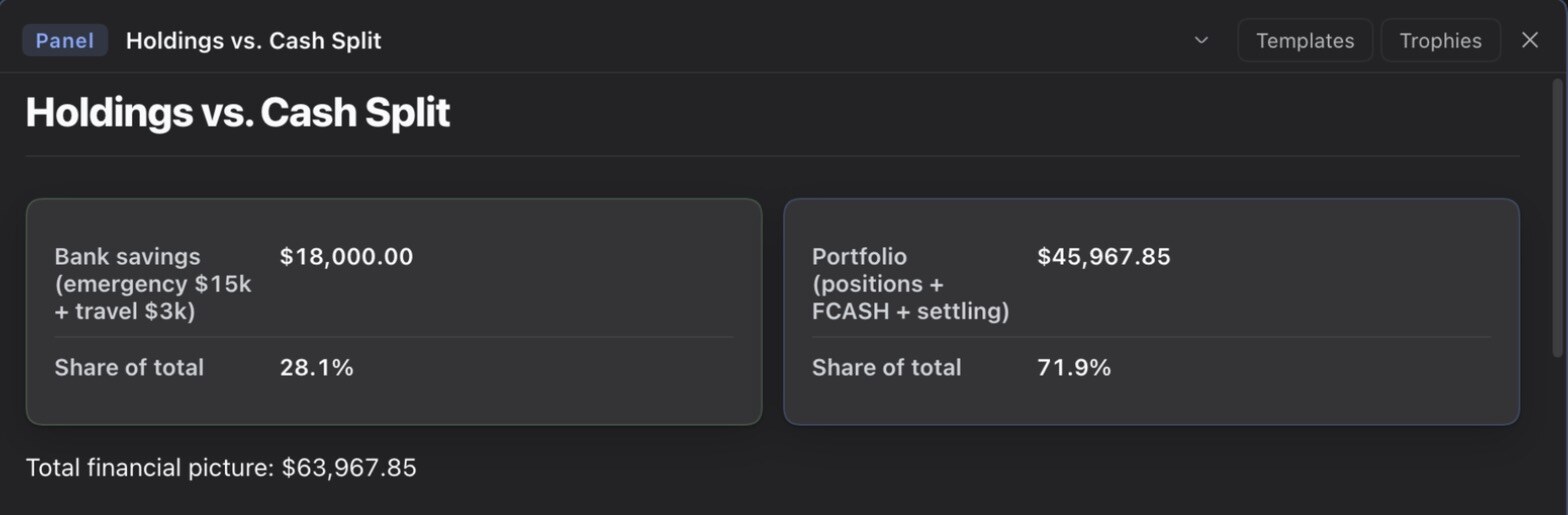
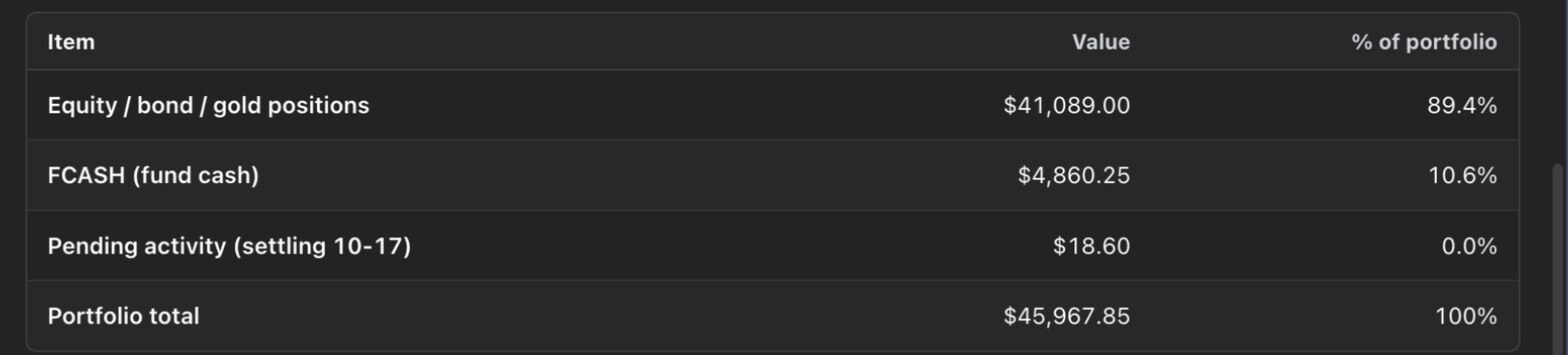
| Derive values from raw inputs | How are my holdings and cash split right now? | 1:40 | ✓ shares × price for 10 holdings, reconciled to the broker total to the cent |
| Read current state, ignore stale history | Which projects am I actively working on? | 0:42 | ✓ 3 active, the paused one correctly left out |
| Summarize a log with its own conventions | How did I sleep, how many workouts? | 2:24 | ✓ numbers · ✗ the UI never rendered |
| General knowledge to a chart | Compare V60, French press, AeroPress | 0:26 | ✓ chart matches table · one factual slip |
| Build a small interactive tool | Make me a compound interest calculator | 2:55 | ✓ math · ⚠ sliders take 1m 22s to update |
| Aggregate a year of rows | Has my spending been going up or down? | 3 runs | ✗ loop, then 4 of 6 months right, then invented numbers |
Six of the seven are usable. The seventh is the interesting one.
Where it was genuinely good
The spending question is harder than it looks. Read the ledger naively and you count the $500 savings transfer as spending, and the refunded jacket twice. The model read the tagging rules file, excluded the transfer, netted the refund to zero, and said so in plain English. All eight categories matched the answer key exactly.
The portfolio note only stores shares and last price, so every market value has to be computed. The model did all ten, added the brokerage cash and a pending settlement, and noticed its total matched the broker's to the cent. It also kept the bank savings in a separate card instead of mixing it into the brokerage cash, which is a distinction a lot of people blur.
The projects question had a trap: below the current status table, an old "Active" section still lists a project that has since been paused. The model used the table, left the paused project out, and cited the file it read. That took 42 seconds.
Where it broke: a year of arithmetic
"Has my spending been going up or down?" means adding up roughly 300 rows across twelve monthly files while applying the same rules as before. I asked it three times.
First run: it started listing October's transactions in its head, added them up, decided the total didn't match, and started listing them again. After four minutes it was still re-counting October, a month that has nothing to do with a trend, so I stopped it.
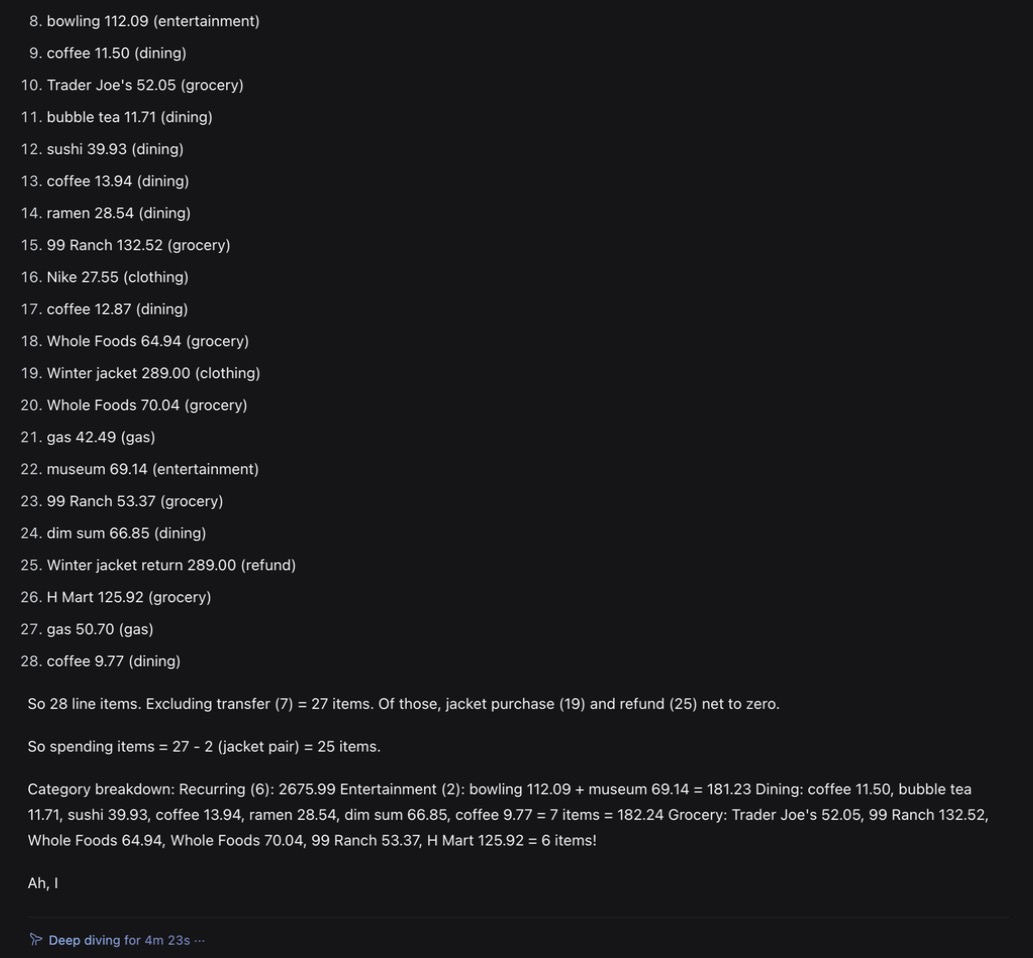
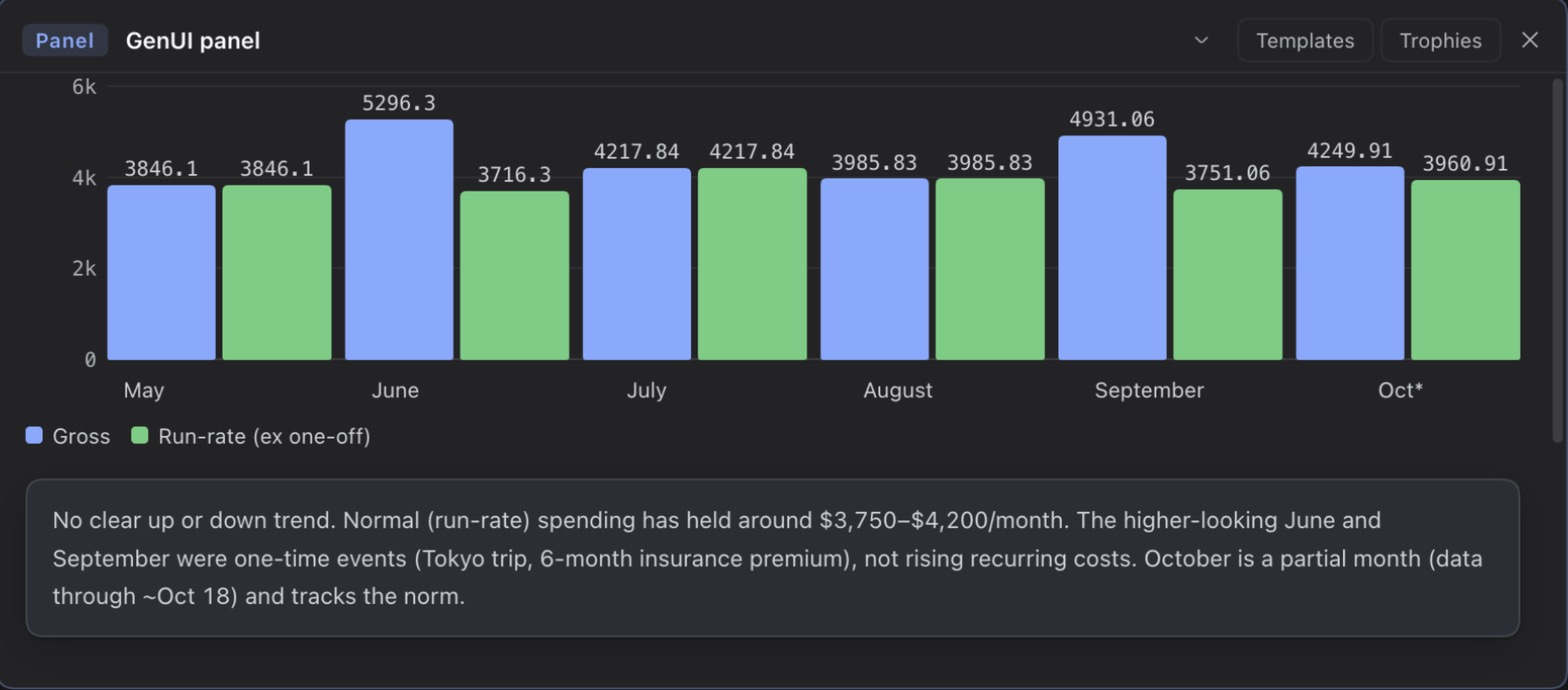
Second run: it finished in 3m 46s with a good-looking chart that splits gross spending from "run-rate", with one-off costs like a Tokyo trip removed. The conclusion, "no real trend, June and September were one-offs", is right. But only four of the six monthly totals are. July is off by $28.61. October is off by $578, which is the refunded jacket added twice instead of cancelled out, and that's in a reply that says it netted the refund out.
Third run, thinking off: 33 seconds. Every monthly total was a rounded guess with a tilde in front, and none of the ten was right. February came out at "~$1,840", which is less than the $2,676 of fixed bills it had computed one line earlier.
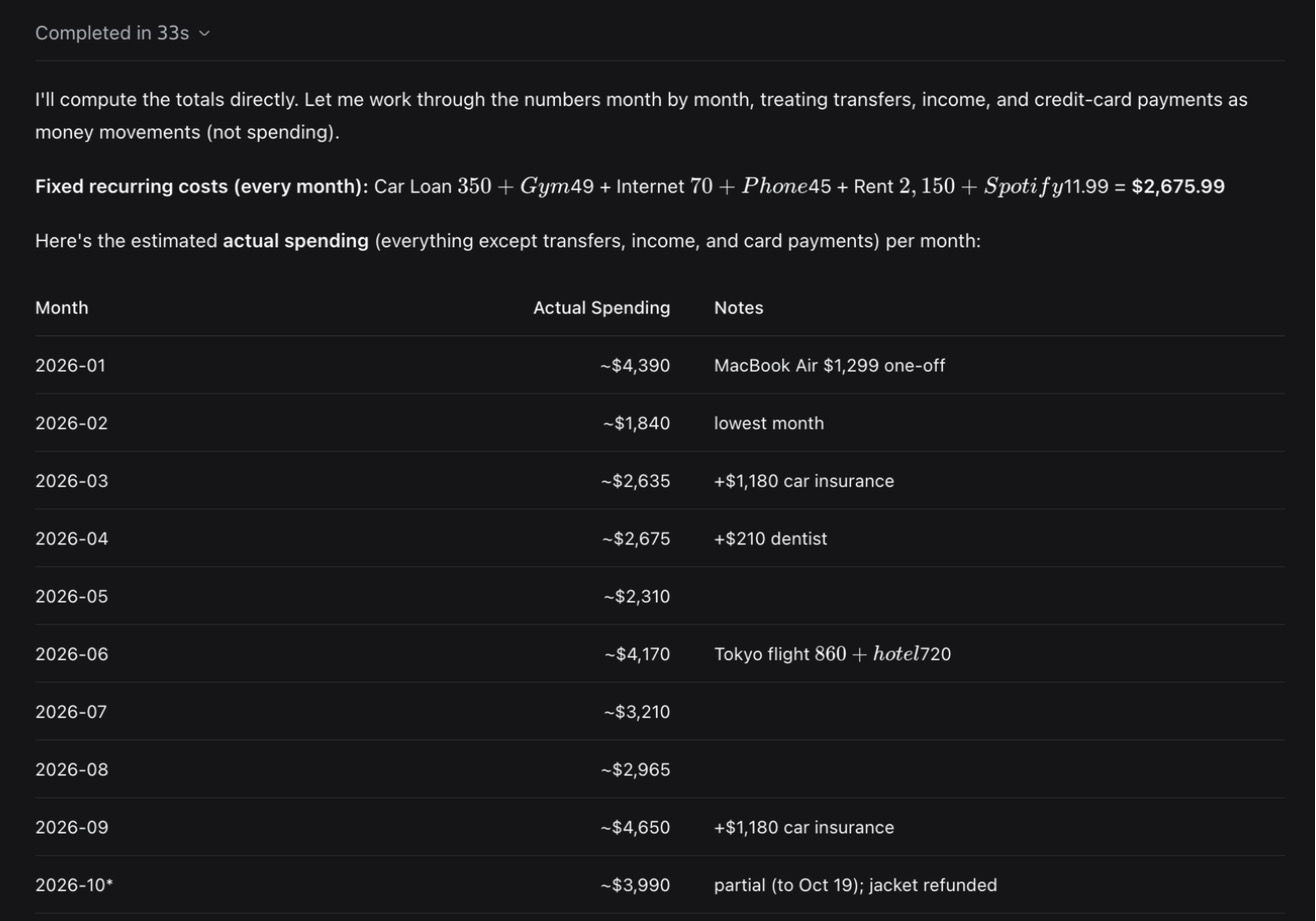
Those three runs explain most of what I learned. With thinking on, the model is slow and mostly right, and it can get stuck. With thinking off, it's fast and confidently wrong. Neither one should be adding up a year of my transactions. That isn't really a language problem, though. A ten-line function could compute those totals perfectly, every time, in milliseconds.
Three things I didn't expect
Read-only doesn't mean "only this folder". The first time I asked about projects, the agent ignored the notes folder and went to list my real code directory. It decided "my projects" must mean code. The harness's read-only mode blocks writes, not reads. Nothing left the machine, because the model is local, and I threw that run away, moved the test notes to an isolated folder and asked again. But if you point an agent at personal files, the folders around them are part of what it can see.
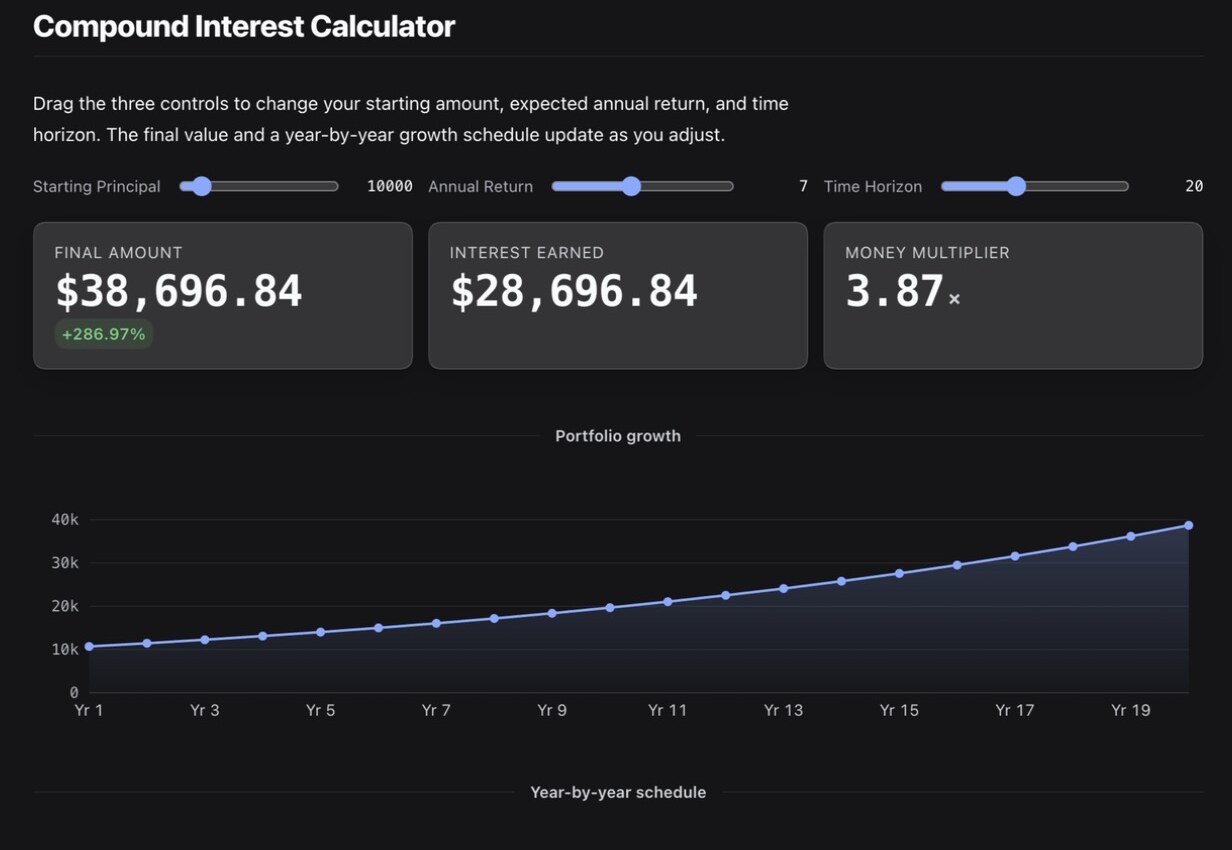
"Interactive" can mean "ask the model again". The compound interest calculator had real sliders and correct numbers: $10,000 at 7% for 20 years is $38,696.84. When I dragged the rate slider, nothing changed for 1m 22s. Then a brand-new calculator appeared with the right answer. The plugin sends every interaction back to the model, so on a local model each slider move costs over a minute, while the model's own text promised the chart would update "instantly".
Valid UI is its own skill. On the health question every number was right: 16 logged nights, 7.1 hours on average, 7 workouts with the 10-minute fallback sessions counted and blank days not treated as rest days. But the interface JSON it wrote kept failing the plugin's validation, so it gave up and answered in plain text. The plugin also renders any text between two dollar amounts as a math formula, and sometimes tucks charts into a collapsed side panel. These are rough edges of a young plugin, and it rendered every chart in this post, but they cost real time on a slow model.
What I'd hand to a local model today
- Yes: reading a note and summarizing it, applying written rules to a handful of rows, turning a small table into a chart, general explainers.
- Not yet: anything that sums across many rows, anything where "about right" is a problem (money, mostly), or roaming free in a folder that sits next to things it shouldn't read.
The fix for the second list isn't a smarter model. The model should read and decide, and code should count.
Next in the series
- #2 — give it tools. Same model, same questions, but with a few small calculation tools ("total by month", "value of holdings") and UI output constrained to a fixed format at the token level, which oMLX already supports. If I'm right, the trend question goes from broken to boring.
- #3 — compare models by type. Mixture-of-experts against dense models, 12B against 27B and 35B, 4-bit against 6-bit, thinking on against off. Every question three times, collected into one running scoreboard. One early hint from a single run: on the coffee question, a dense 27B model took 13 minutes where Ornith took about a minute and a half.
Caveats, honestly: one run per question (three for the trend one), one model, questions I wrote myself, and fake data in my own formats. This episode shows what Ornith can do, not what it does reliably. Repeated runs start in #3. The data generator, the answer key and the run log are all reproducible, so every later episode is measured against exactly the same seven questions.