The earlier episodes in this series asked whether a local model can do something: keep a ledger, build a slide deck, run fast enough. This one asks a different question. If I stopped using Claude tomorrow and ran everything on a local model, would my usual work still get done?
So I wrote ten tasks, all things I really hand to an AI: answering questions, cleaning up files, writing posts, changing my website, and hunting for bugs. Each task went, word for word, to two setups: Claude Opus 5.5 on one side, and Qwen3.8-27B running on my Mac on the other.
The short version: for questions, file work and writing, Qwen got the same right answers as Opus, just 2–3× slower. It could also make website changes correctly, but 3–7× slower, and when hunting bugs it missed the ones you only catch by understanding what the page is supposed to mean.
The two setups
First, a word on thinking effort. Opus ran at xhigh, my everyday setting in Claude Code. Qwen ran at low by default, mainly to keep the tests fast: a 27B model on a laptop produces a few dozen tokens a second, so the longer it thinks, the slower everything gets.
The rule: if local Qwen can finish a task at low, the effort stays at low; if it can’t, both sides are re-run at high. Of the ten tasks, only the bug hunt fell short at low, so both sides re-ran it at high, and the table shows the re-run. On the tag-filter task Qwen got everything right and only ran over time; raising the effort would only make it slower, so I didn’t re-run it.
| Local | Cloud | |
|---|---|---|
| Harness | DeepSeek Harness 0.2.1 desktop, Standard mode | Claude Code desktop |
| Model | Qwen3.8-27B, 4-bit (oQ4e), with MTP | Claude Opus 5.5 |
| Runs on | M5 Pro 48GB, oMLX 0.7.3rc1, fully offline | Anthropic’s cloud |
| Thinking effort | low (high for the bug hunt) | xhigh (high for the bug hunt) |
| Permissions | Workspace Write: read and write the workspace, run commands | auto: routine actions approved automatically |
| Context / max output per reply | 172K / 32K tokens | Claude Code defaults |
| Generation speed | about 43 tok/s on a short prompt, 31 at 16K of context, 25 at 64K (measured) | not measured |
| Scheduling | one task at a time | several tasks at once |
How I tested
- Same prompt. Each task is the one Chinese sentence I would normally type, identical for both sides.
- Same starting point. Website tasks started from a fresh copy of the same version of my site. Ledger tasks used a demo ledger full of made-up data.
- Scripts decide pass or fail, not the model’s own summary. Anything that could be checked by a script was: spreadsheets cell by cell, web features by clicking through them in headless Chrome. A nicely written summary earns nothing.
- Time limit. 30 minutes per task. Going over counts as not finished.
- Sample size. One run per task per side.
Results: ten tasks
| Task | What it asks | Qwen3.8 | Time | Opus 5.5 | Time |
|---|---|---|---|---|---|
| Q&A | 10 everyday questions: compound interest, dates, code output, git rescue, regex, SQL, VRAM estimate, a logic puzzle, HTTP, a rewrite | ✅ 20/20 | 2.3 min | ✅ 20/20 | 1.2 min |
| Bookkeeping | Log a few expenses in the right months by the rules (two decimals, skip what wasn’t bought) | ✅ 14/14 | 2.3 min | ✅ 14/14 | 0.4 min |
| Posts | Turn a speed benchmark into an X post and a Xiaohongshu post | ✅ no factual errors | 1.1 min | ✅ no factual errors | 1.2 min |
| CSV cleanup | Seven date formats, negatives in brackets, duplicate rows: normalise, then total | ✅ 12/12 | 3.8 min | ✅ 12/12 | 1.2 min |
| Yearly spreadsheet | Twelve months of ledgers into a month × category table with a trend chart | ✅ all 120 cells right | 10.2 min | ✅ all right | 4.3 min |
| October deck | One sentence to an October spending deck | ✅ numbers all right | 11.3 min | ✅ numbers all right, 3 extra analysis slides | 12.8 min |
| Publish a post | Turn a Chinese draft into Chinese and English posts on the site | ✅ 15/15 | 12.6 min | ✅ 15/15 | 3.9 min |
| Fix a bug | The “中” language button on post pages goes to the wrong page | ✅ 5/5 | 6.3 min | ✅ 5/5 | 2.2 min |
| Add a feature | Tag filter on the Writing page, in both languages, good on phones | ✅ 13/13, over time | 37 min | ✅ 13/13 | 5.2 min |
| Find bugs | Five bugs planted in the site; report only, don’t fix (both at high) | ⚠️ found 2 | 40 min | ✅ found all 5 | 6.6 min |
On the bug hunt, Qwen at low found 3 bugs in 31 minutes; at high it found only 2, in 40 minutes.
Overall, Opus got all ten right. Qwen got nine right (one of them over the time limit) and found only some of the planted bugs. On time, Qwen took 127 minutes for the ten tasks and Opus took 39. Taking the time ratio for each task, the median is 3× slower for Qwen.
Where Qwen did well
Numbers and rules are solid. The bookkeeping, the CSV cleanup, the yearly spreadsheet and the figures in the deck were all correct, not a single wrong cell. Its habit is steady: read the rules carefully, write a Python script to do the maths, then check the result. Slow, but it doesn’t cut corners.
It doesn’t fake it. In ten tasks Qwen never once claimed to be done when it wasn’t. Every summary matched the actual files, down to “not committed, not pushed, draft left untouched”.
Q&A is fully covered. All ten answers were right, and the regex and SQL passed the test cases I ran them against.
Where Qwen struggled
1. It’s slow, and slower the more complex the task. Being 2–3× slower on simple tasks is fine. But on a task like adding a tag filter, which means changing code, building and checking over and over, Opus took 5 minutes and Qwen took 37.
2. It missed the bugs that need understanding, and more thinking didn’t help. Of the five planted bugs, Qwen found the broken image and the Chinese/English date mismatch both times. It caught the wrong About page title at low but missed it at high. Both times it missed that the post list was sorted oldest-first, and that a link on the Chinese home page led to the English site. Oddly, both reports noted that one post sorts in between others, without realising the whole list was reversed. Opus went through all 66 pages in a browser, compared every Chinese/English pair, and found all five in 6.6 minutes.
3. Subagents make the slowness worse. On the first bug-hunting run, Qwen started four subagents to check in parallel. In the cloud, subagents really run in parallel. Locally there is one GPU, so the four just queued up, and after more than an hour they still hadn’t finished.
The extra step Opus takes
On pass or fail the two often tied. The difference is that Opus tends to think one step further:
- While fixing the bug, it added a regression check to the site’s test script, so the same mistake will fail the build next time.
- While publishing the post, it pointed out that a “+6%” in my draft’s table actually works out to +5.4% from the table’s own numbers.
- For the yearly spreadsheet it built a detail sheet plus formulas, so editing a line updates the totals. Qwen computed the totals in a script and pasted in fixed values.
- In the deck it added a few historical comparison slides (11-month average, same month last year, a month-end forecast). I recomputed each one from the ledgers, and all were right.
- In the tag filter, it put the tags on phones in a single row that scrolls sideways, so the first post still shows on the first screen (pictures below).
Two surprises
Surprise one: on desktop the two tag filters look almost identical. The difference only shows on a phone.
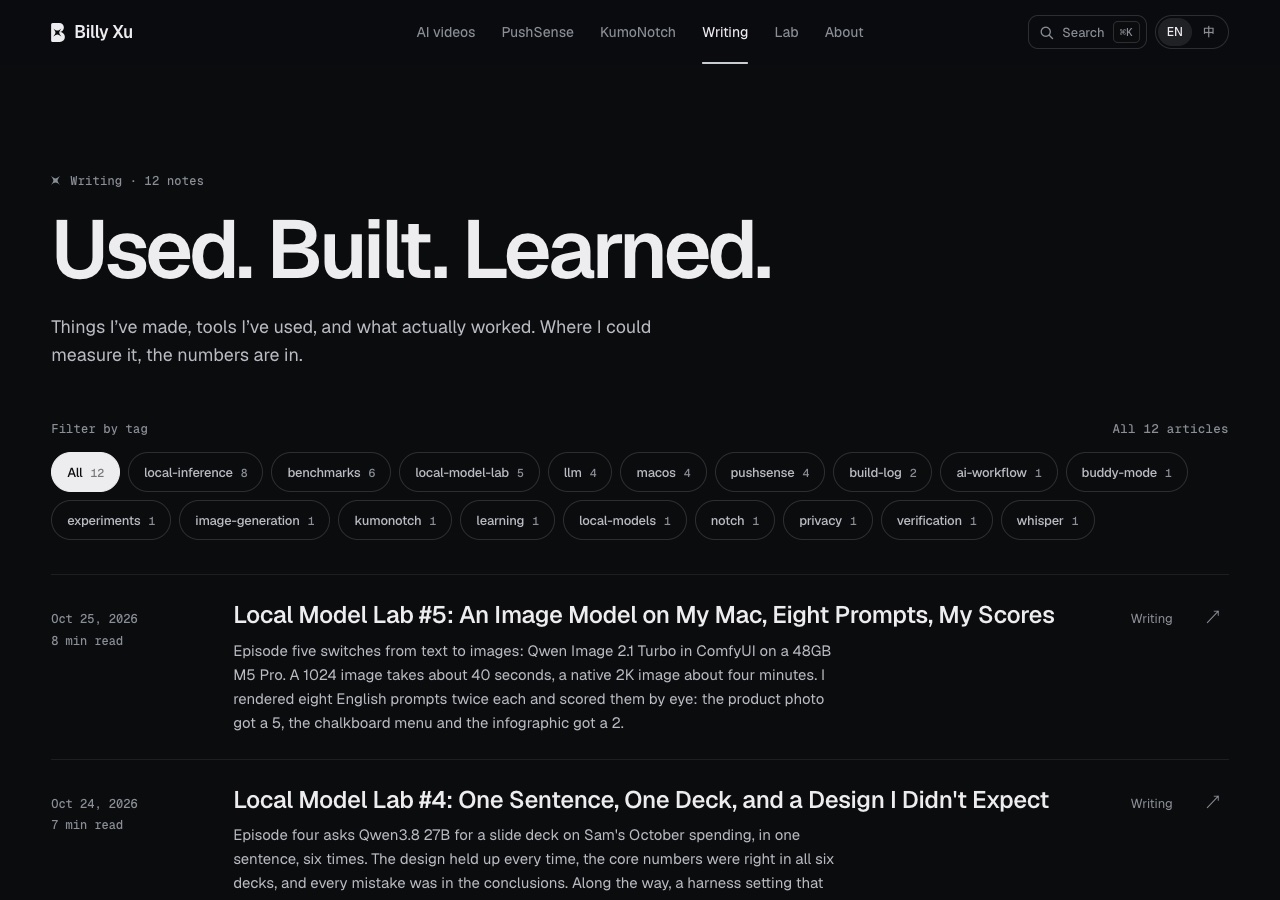
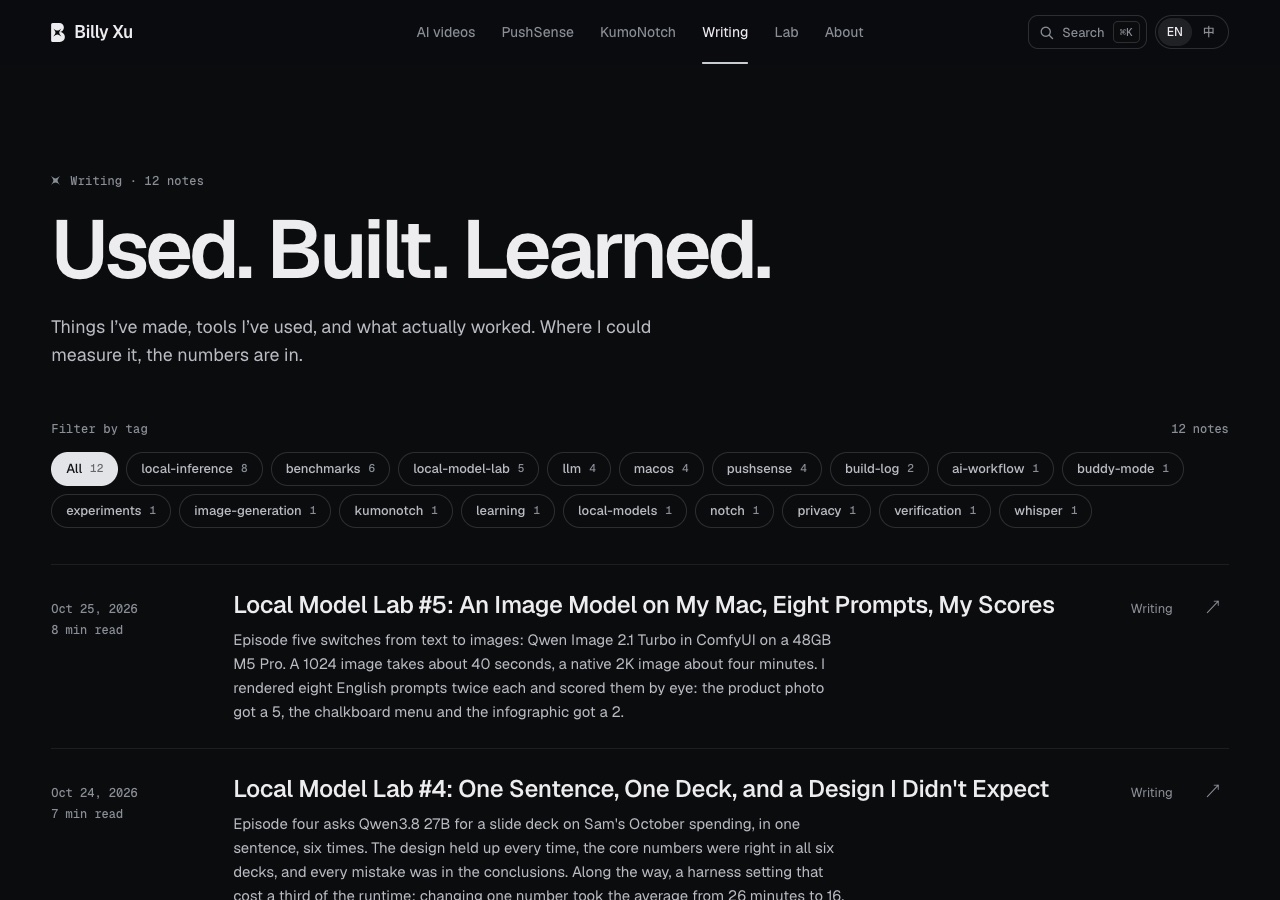
Qwen’s is on top, Opus’s below. Both say “Filter by tag”, both use pill buttons with post counts, both sort by count. When a site already has a design system, both models follow it faithfully.
On a phone it’s a different story:
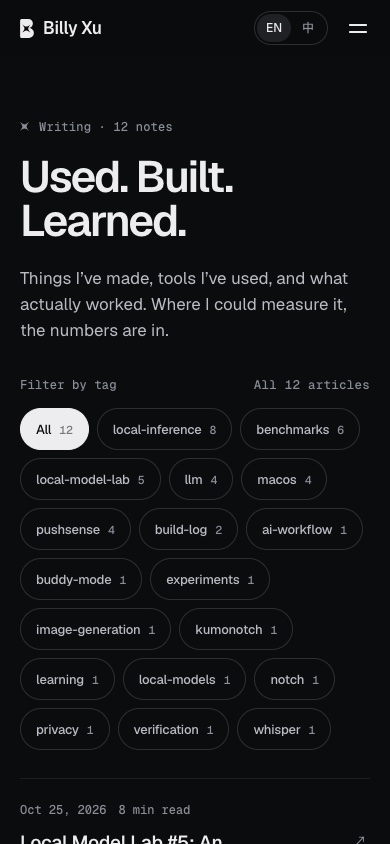
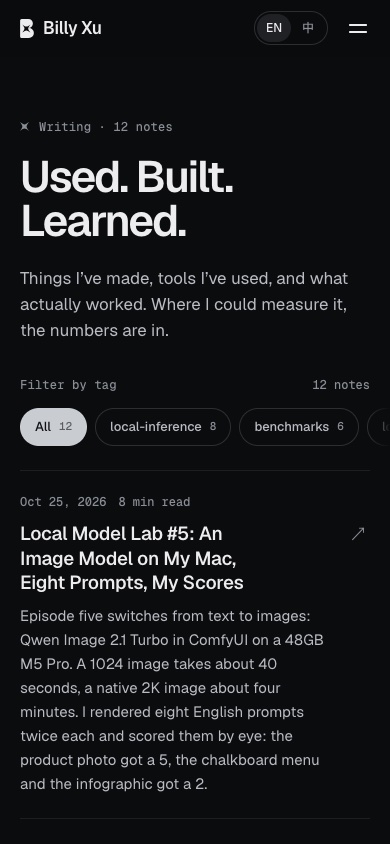
On the left, Qwen wraps all 22 tags onto as many rows as it takes, so the whole first screen is tags and the posts are pushed below. On the right, Opus keeps the tags in one row that scrolls sideways, and the first post is still on screen. One small detail: Qwen’s counter reads “All 12 articles”, while Opus’s reads “12 notes”, matching the “Writing · 12 notes” line at the top of the page. Both passed the same 13 checks. A script can’t catch this kind of difference; a person has to look.
Surprise two: the tests found real problems on my live site. In the bug hunt, besides the five planted bugs, both sides reported a few small issues that really exist, such as a language-mix figure that differs between the Chinese and English PushSense pages, and one post whose tags were never translated into Chinese. Neither side reported anything false.
Mistakes I made along the way
To make the results trustworthy, a few confessions:
- The bug hunt leaked its answers. The first time, I planted the bugs in a separate git commit, and Opus read the commit history and knew exactly which five places had changed. I removed the history and re-ran both sides.
- The answers leaked a second time. Even without the history, Opus’s re-run found all five again. Going back through the logs, I found why: Claude Code sessions started from the same conversation share a notes folder. The first session had written its findings there, and the re-run read them right at the start. I threw that result away. For the final high-effort runs I put each copy of the site in its own separate folder, emptied the notes, and afterwards checked every file each side read and every command it ran. Neither stepped outside its folder. The table shows those runs.
- The task bank was contaminated. The seed file for the bookkeeping task had been overwritten with the answers by an earlier test more than a month ago. I restored it and re-ran both sides.
- My checking scripts made mistakes too. Opus’s spreadsheet used SUMIFS formulas, which my script couldn’t evaluate at first, so it marked a correct answer wrong. Another time it read a footnote under the table as the October row. After fixing both, I deliberately broke a few cells to confirm the script still catches them.
- A power cut. My laptop ran out of battery once and interrupted a Qwen run. I threw it away and ran it again.
My verdict
| My everyday work | Can local Qwen do it? |
|---|---|
| Questions, looking things up | Yes |
| Files, spreadsheets, CSVs, bookkeeping | Yes, 2–3× slower |
| Posts, translation, bilingual articles | Yes |
| Small bug fixes and small features | Gets them right, but 3–7× slower |
| Auditing the website | Halfway; misses issues that need understanding |
If I were to run my work on a local model, I’d split it like this:
- Hand it the work built on numbers, rules and files. It’s steadier than I expected.
- Keep urgent work, and audits that need real understanding, on Claude.
- Check UI changes on a phone yourself. Passing every scripted check doesn’t mean the experience is the same.
- Don’t let it start subagents. There’s one GPU locally, so subagents just wait in line.
Limits and what’s next
- One run per task, so this says nothing about consistency.
- Apart from the bug hunt, the two sides ran at different thinking effort (Qwen low, Opus xhigh).
- The Claude side ran several tasks at once, which makes its times a little longer.
- Web research and browser-based site testing weren’t covered: the first needs a search service I haven’t set up, and I reviewed the browser plugin and decided not to install it for now.
- Building a complete website from scratch isn’t in this episode either.
Next up:
- A separate “build a website from scratch” task that I’ll write myself, with all the reference material in the prompt so no web research is needed. Research over the web is where a local model loses the most time.
- Analysis-heavy tasks like the deck at high effort for Qwen, to see how much of the gap it closes.
- When Qwen4 comes out, the same tasks again for a direct comparison.